
If you're looking to enhance your trading game, the XFisher_org_v2 Candle Alerts indicator is a must-have tool for MetaTrader 5. This nifty indicator provides timely alerts and can send email and push notifications when trading signals are generated. Here’s a quick rundown of the signal options you can set:
- Zero breakthrough by the candle;
- Change in candle movement direction;
- Breakthrough of overbought or oversold levels;
- Exiting overbought or oversold zones.
Setting Up Your Alerts:
input uint NumberofBar=1;          // Bar number for the signal activation
input bool SoundON=true;           // Enable alerts
input uint NumberofAlerts=2;       // Number of alerts
input bool EMailON=false;          // Enable mailing the signal
input bool PushON=false;           // Enable sending the signal to mobile devices
This indicator utilizes the SmoothAlgorithms.mqh library classes, so make sure to copy it to your <terminal_data_folder>\MQL5\Include directory. For a deeper dive into the functionality of these classes, check out the article titled "Averaging Price Series for Intermediate Calculations Without Using Additional Buffers".
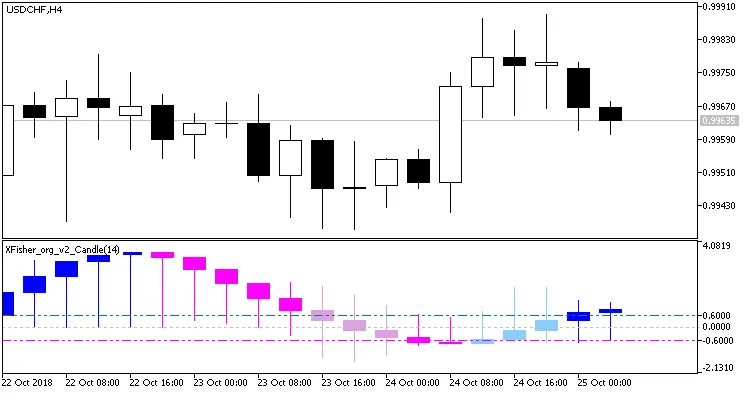
Fig. 1. XFisher_org_v2_Candle_Alerts indicator. Changing the histogram movement direction
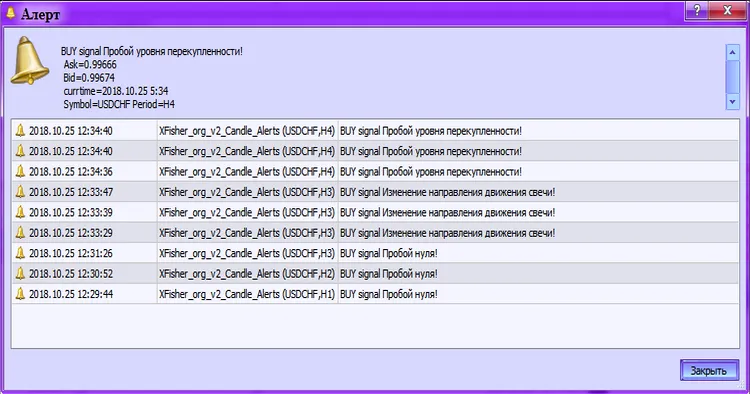
Fig. 2. XFisher_org_v2_Candle_Alerts. Activating an alert
Related Posts
- Unlocking the Power of Master Tools for MetaTrader 4
- Hourly Buffers for Data Collection in MetaTrader 5: A Simple Guide
- Unlock Trading Insights with Volume Profile + Range v6.0 for MetaTrader 5
- Unlocking MetaCOT 2: Your Ultimate CFTC Indicator Toolkit for MT4
- Mastering the MACD Candle Indicator for MetaTrader 4