
Author: kharko
The i-Regression Channel is a powerful tool for traders using MetaTrader 5, designed to help you visualize price movements through a regression channel.
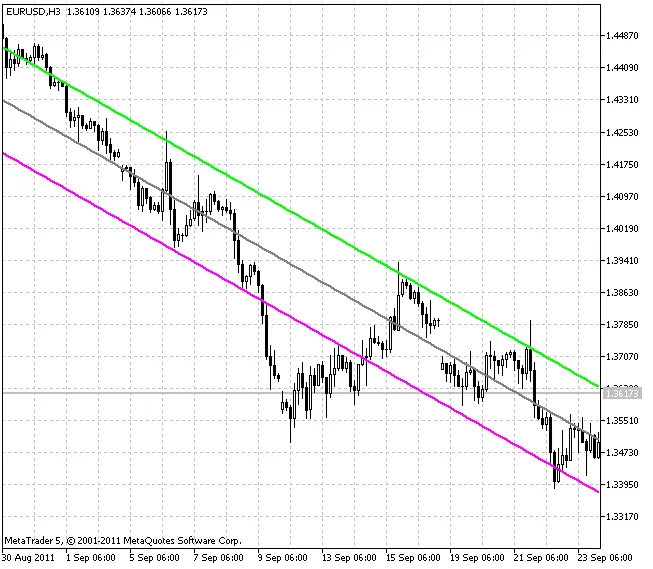
This linear regression channel is made up of two parallel lines that sit at equal distances from the linear regression trend line. The distance between the channel's borders and the regression line represents the highest deviation of the closing prices from the regression line.
The indicator comes in two flavors:
- i-Regr_Channel_Time.mq5 - This version calculates the channel starting from a specific date you set in the input parameters.
- i-Regr_Channel_Bars.mq5 - This version calculates the channel based on a specific number of bars you define.
Input Parameters for the Indicator:
- degree - This sets the degree of regression, which can range from 1 to 61.
- kstd - This defines the width of the regression channel.
- data - Here, you specify the start date for channel calculations.
- CountBars - This indicates how many bars will be used for channel calculations.
- Applied_price - This lets you choose the price to be applied.
- shift - This allows you to set a horizontal shift of the channel in bars.
This indicator was first introduced in MQL4 and was published in the Code Base at mql4.com on February 27, 2009.
Linear Regression Channel (Degree = 1):
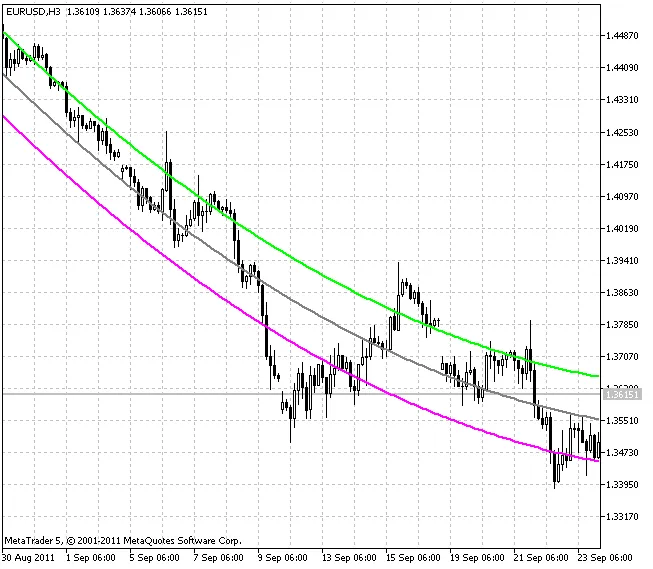
Square (Parabolic) Regression Channel (Degree = 2):
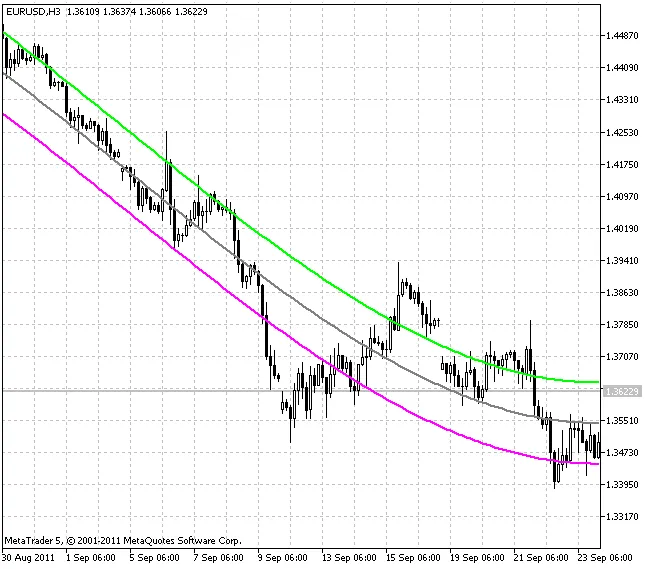
Cubic Regression Channel (Degree = 3):




Comments 0