
Hey there, fellow traders! Today, we’re diving into the Fractional_Bands indicator, specifically the Fractional_Bands_HTF version. This powerful tool gives you the flexibility to select timeframes right from the input parameters, making it a fantastic addition to your trading arsenal.
Setting Up the Indicator
The first thing you’ll need is the compiled custom indicator file, Fractional_Bands.mq5. Make sure to place it in your MetaTrader 5 directory at <terminal_data_folder>\MQL5\Indicators.
Compiling and Using the Indicator
After you compile it, you’ll end up with the Fractional_Bands_HTF.ex5 file, which includes the Fractional_Bands as a resource. This means you won’t need the original indicator in your terminal folder for it to run smoothly!
How It Works
The magic happens because the indicator executable file is bundled with the resources at a global scope. Here’s a quick snippet of the code:
//---- Include custom indicators in the indicator code as resources
#resource \\Indicators\\Fractional_Bands.ex5
Next, we’ve modified the string path in the OnInit() function to get the handle of the Fractional_Bands indicator:
//---- getting handle of the Fractional_Bands indicator
   Ind_Handle=iCustom(Symbol_, TimeFrame, "::Indicators\\Fractional_Bands",
                      e_period, normal_speed, PIP_Convertor, alpha, IPC,0, PriceShift, Upper_color, Middle_color, Lower_color, FontSize);
This setup means you can use the compiled executable file of the repeater indicator on any trading terminals without needing the original indicator. How cool is that?
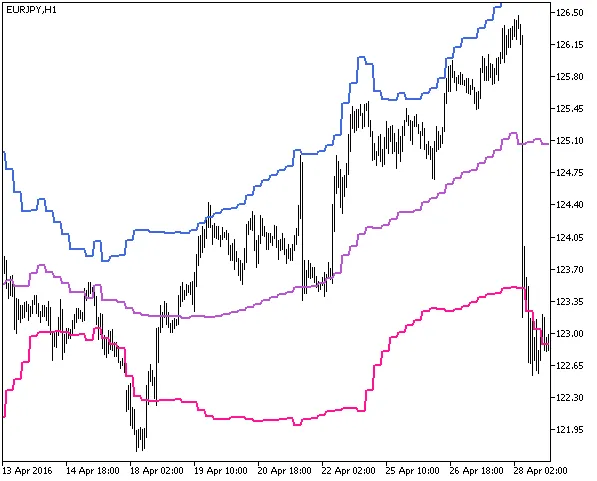
Fig1. The Fractional_Bands_HTF indicator
Related Posts
- Unlocking MetaCOT 2: Your Ultimate CFTC Indicator Toolkit for MT4
- Unlocking the Power of Master Tools for MetaTrader 4
- Visualize Current Trends Across All Time Frames with This MetaTrader 4 Indicator
- Unlocking the Power of Multi-Timeframe Tymen STARC Bands for MetaTrader 5
- Hourly Buffers for Data Collection in MetaTrader 5: A Simple Guide