
The WATR_HTF_Signal indicator is a powerful tool that helps you determine trend direction or generate trade signals based on the WATR indicator. It visualizes this information as a graphical object, complete with color coding to indicate the trend or trading direction. Plus, it can send alerts and even play audio signals, so you never miss a beat!
When the trend continues at your selected bar, you’ll see a right arrow that matches the trend's color. Conversely, if the trend shifts at that bar, a diagonal arrow appears, indicating the new direction with its corresponding color.
The input parameters for the indicator can be organized into three main categories:
-
WATR Indicator Input Parameters:
//+------------------------------------------------+
//|  Indicator input parameters                     |
//+------------------------------------------------+
input string Symbol_=""; // Financial asset
input ENUM_TIMEFRAMES Timeframe=PERIOD_H6; // Indicator timeframe for calculation
input uint WATR_K = 10;
input double WATR_M = 4.0;
input uint ATR=21;
-
Visualization Parameters for WATR_HTF_Signal:
//---- indicator display settings
input uint SignalBar=0; // Bar number for getting a signal (0 - current bar)
input string Symbols_Sirname=INDICATOR_NAME"_Label_"; // Indicator labels names
input color Upsymbol_Color=clrAqua; // Uptrend symbol color
input color Dnsymbol_Color=clrMagenta; // Downtrend symbol color
input color IndName_Color=clrGray; // Indicator name color
input uint Symbols_Size=60; // Signal symbols size
input uint Font_Size=10; // Indicator name font size
input int X_1=5; // Horizontal name offset
input int Y_1=-15; // Vertical name offset
input bool ShowIndName=true; // Indicator name display
input ENUM_BASE_CORNER WhatCorner=CORNER_RIGHT_UPPER; // Display corner
input uint X_=0; // Horizontal offset
input uint Y_=20; // Vertical offset
-
Alert and Audio Signal Parameters:
//---- alerts settings
input ENUM_ALERT_MODE alert_mode=OnlySound; // Indicator triggering option
input uint AlertCount=0; // Number of alerts
If you plan to use multiple WATR_HTF_Signal indicators on a single chart, make sure each one has a unique value for the Symbols_Sirname variable (this will differentiate the indicator labels).
To get started, place the compiled indicator file WATR.mq5 in your terminal data folder under MQL5/Indicators/.
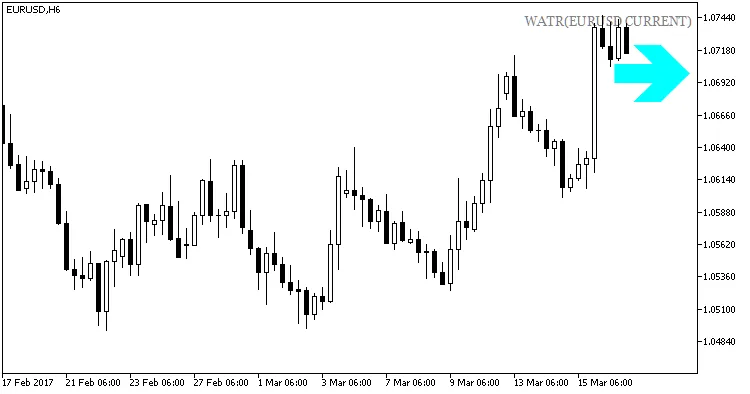
Fig1. The WATR_HTF_Signal indicator. A signal of uptrend continuation
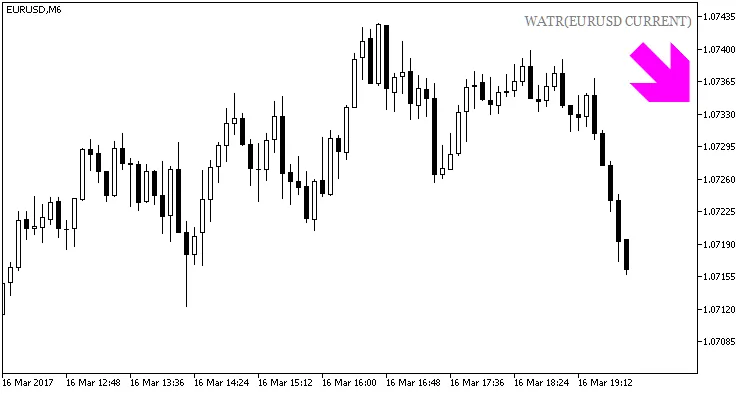
Fig.2. The WATR_HTF_Signal indicator. A signal for opening a short position
Related Posts
- Unlocking MetaCOT 2: Your Ultimate CFTC Indicator Toolkit for MT4
- Hourly Buffers for Data Collection in MetaTrader 5: A Simple Guide
- Unlock Trading Success with the iStochKomposter_HTF_Signal Indicator for MetaTrader 5
- Using NRTR_extr_HTF_Signal for Trend Analysis in MetaTrader 5
- Unlocking the Power of Master Tools for MetaTrader 4