
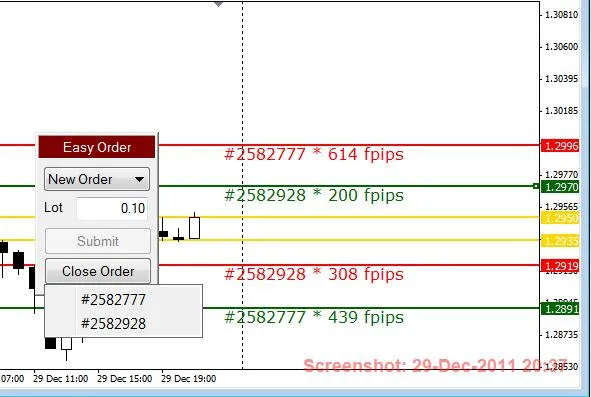
Welcome to our guide on the SL-TP Pip Calculator for MetaTrader 4! This handy tool helps you determine the pips between your Order Execution price and your Stop Loss (SL) or Take Profit (TP) levels. Whether you're just starting out or looking to refine your trading skills, this calculator will make your trading decisions a breeze.
Key Features of the SL-TP Pip Calculator
- Calculate SL to Order Execution Price: Easily find out how many pips are between your Stop Loss and the Order Execution price.
- Calculate TP to Order Execution Price: Determine the pips between your Take Profit and Order Execution price effortlessly.
- Pip Settings: You can set the calculation to display pips or fractional pips (e.g., 20 pips / 200 fpips).
- Order Ticket Visibility: Choose whether to show or hide Order Tickets on your chart.
- SL Visibility Options: Set [Show_SL] to false to hide all SL pip & ticket text.
- TP Visibility Options: Set [Show_TP] to false to hide all TP pip & ticket text.
- Customizable Colors: Change the colors of your SL & TP indicators for better visualization.
- Adjustable Text Size: Modify the text size to suit your preferences.
- Text Positioning: Position the text to the right or left of the current price bar as per your choice.
Note: If your Chart-Shift is off, the SL & TP text may appear off the right side of the chart. To adjust the text position, increase the Move_Text_L_or_R setting. Keep in mind that non-digit symbols will default to pips, regardless of whether fractional pips are enabled.
Looking for a convenient way to place your orders? Check out our Easy Order script for a smoother trading experience.




Comments 0