
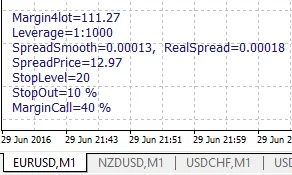
Hey fellow traders! If you're using MetaTrader 4, let’s dive into the ShowImportantParams indicator. This handy tool displays key parameters for your trading symbol and account, which can fluctuate during significant news events or as we approach the end of the trading week.
Key Parameters That May Change
- Leverage: This can be adjusted downwards, depending on market conditions.
- StopLevel: These are the levels for your stop loss and take profit orders, measured in points. Be aware that these can widen during news releases and at the week's close.
- MarginCall: If you hit this drawdown level, it’s usually a good idea to either deposit more funds or close some open trades.
- StopOut: Once this drawdown level is reached, your broker may start closing out some of your losing trades to protect your account.
Parameters That Fluctuate with Market Conditions
Next up, we have the parameters that change based on the current market quotes:
- Margin4Lot: This indicates the margin required when opening one lot.
- SpreadSmooth: The current spread, averaged over a specific number of ticks.
- RealSpread: The current spread without any averaging applied.
- SpreadPrice: This shows the price of the averaged spread in your deposit currency.
Customizable Parameters
Lastly, here are some customizable parameters to tailor the indicator to your preferences:
- FontSize: Adjust the size of the text.
- FontColor: Choose your preferred font color.
- FontName: Select the font style you like best.
- XOffset: Set the horizontal distance from the bottom left corner (in pixels).
- YOffset: Determine the vertical distance from the bottom left corner and line spacing (in pixels).
- SpreadSmoothTicks: Define the averaging period for the spread value.




Comments 0