
If you’re looking to supercharge your trading strategy, you might want to check out a dynamic duo of indicators: BykovTrend_V2 and ColorX2MA. These two indicators come together seamlessly within one EA, making it easier than ever to spot trading opportunities.
The magic happens when a bar closes. If either of the indicators signals a trend change—indicated by a color shift—you’ll get a prompt to open a trade. It’s a straightforward approach that can help you capitalize on market movements with precision.
To get your EA up and running like a well-oiled machine, ensure that the compiled files for the indicators, BykovTrend_V2.ex5 and ColorX2MA.ex5, are placed in your <terminal_data_directory>\MQL5\Indicators folder. This step is crucial for everything to function smoothly.
For the tests highlighted below, we used the default EA inputs. Keep in mind that we didn’t implement Stop Loss or Take Profit settings during testing, so these results focus purely on the indicators’ performance.
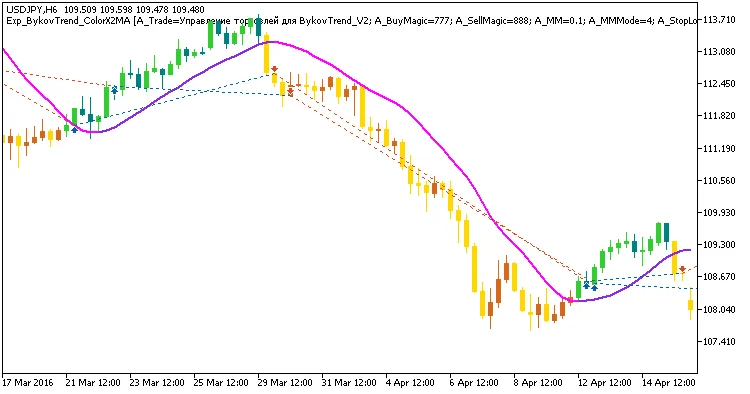
Fig 1. Exemplary trades in the chart
Here’s a look at the test results for USDJPY on the H6 chart over the year 2016:
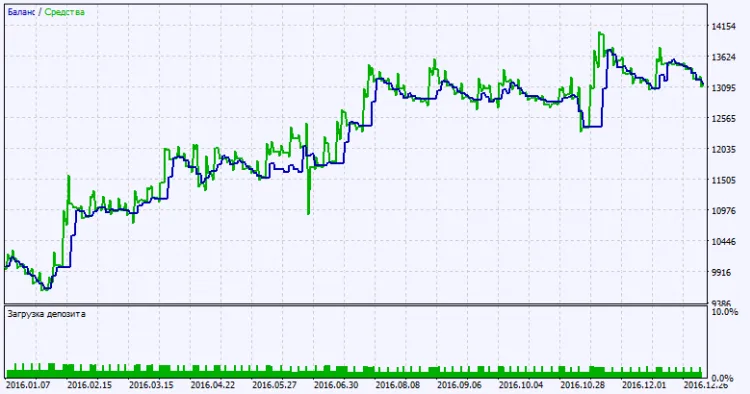
Fig. 2. Testing results chart




Comments 0