
If you’re looking to upgrade your trading game, the Exp_ADX_Cross_Hull_Style trading system is definitely worth checking out. This system is all about capturing trend changes as indicated by the ADX_Cross_Hull_Style trend indicator. The real magic happens at the close of each bar when a new color point signals the perfect moment to make a trade.
But wait, we don’t want to jump the gun with false signals. To keep our trades aligned with the trend, this Expert Advisor (EA) incorporates trade signal filtering through the UltraXMA trend indicator. Essentially, when the ADX_Cross_Hull_Style gives an entry signal, the UltraXMA indicator provides the necessary opposite signals for closing positions—keeping you on the right track.
To get started, simply drop the ADX_Cross_Hull_Style.ex5 and UltraXMA.ex5 files into your terminal's terminal_data_folder\MQL5\Indicators directory. Just a heads-up: the Exp_ADX_Cross_Hull_Style_.mq5 file is a simplified version of the trading platform and doesn’t include the trade signal filtering feature.
During the tests shared below, we used the default input parameters for the EA, and we didn’t apply any Stop Loss or Take Profit settings.
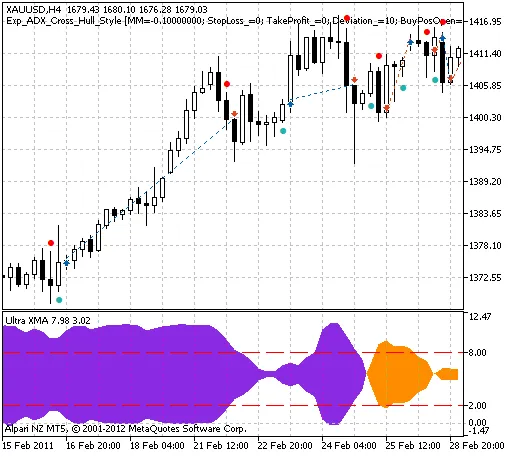
Fig. 1. The instances of history of deals on the chart.
Here’s what the testing results looked like for 2011 on the XAUUSD H4 chart:
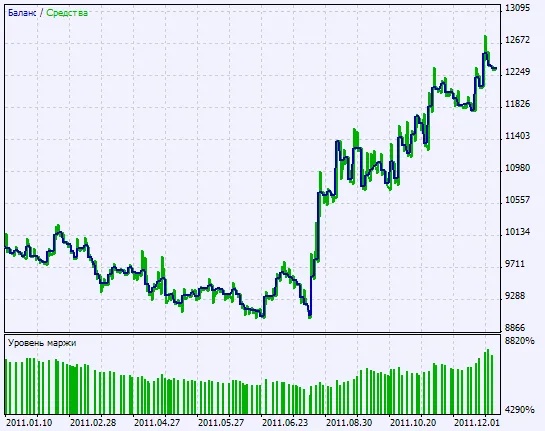
Fig. 2. Chart of testing results




Comments 0