
Unlocking the Potential of the Exp_ColorSchaffJCCXTrendCycle EA
If you’re looking to enhance your trading strategy, the Exp_ColorSchaffJCCXTrendCycle Expert Advisor is definitely worth your attention. This EA is built on the ColorSchaffJCCXTrendCycle oscillator, which effectively identifies shifts in market momentum by analyzing overbought and oversold levels. You’ll receive trading signals as bars close, particularly when there’s a breakthrough at the zero level.
Getting Started with the EA
To begin, simply place the compiled files for JCCX.ex5 and ColorSchaffJCCXTrendCycle.ex5 into your <terminal_data_folder>\MQL5\Indicators directory.
One key feature is the TradeAlgorithms.mqh library. This allows you to use Expert Advisors with brokers offering a nonzero spread and lets you set both Stop Loss and Take Profit at the same time you open a position. For more options, check out additional variants of the library here: Trade Algorithms.
Testing Parameters
During the tests shown below, we used the default input parameters for the Expert Advisor. Notably, Stop Loss and Take Profit settings were not utilized in this testing phase.
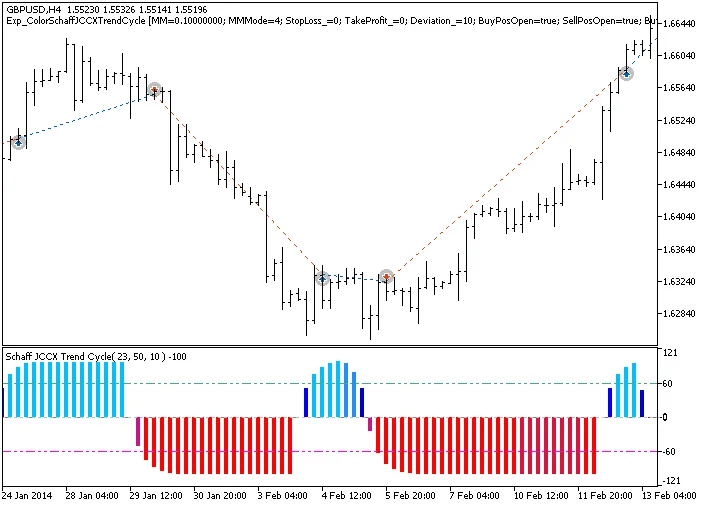
Fig.1. Examples of deals on the chart
Testing Results for GBPUSD on H4
We conducted thorough testing for the year 2014 using the GBPUSD H4 timeframe:
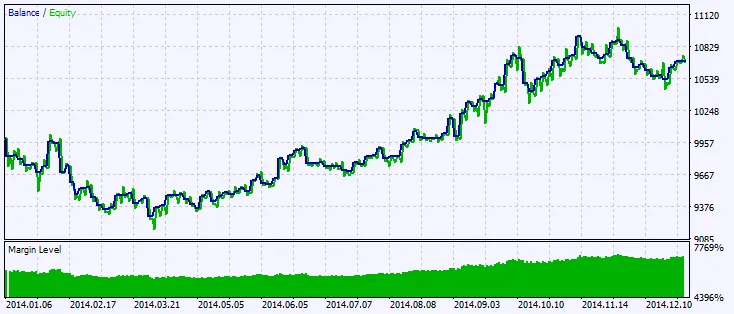
Fig.2. Testing results chart




Comments 0