
The Exp_EF_distance trading system is designed around the trend direction changes indicated by the EF_distance indicator. This system is a game-changer for traders looking to capitalize on trend shifts.
A signal is generated when a bar closes, which depends on the direction change of the Moving Average as shown by the indicator. This helps us stay ahead of the curve!
To avoid false signals during flat market conditions, we use the Flat-Trend volatility indicator. It has three states that determine whether there’s sufficient trend strength to open a position. The filtering of trades is managed by the input parameters of the Expert Advisor.
input Volatility Volatil=V3; // The size of volatility to perform deals
It’s worth noting that filtering applies only to entries; exits are without filtering, making your exit strategy a little more flexible.
To get started, just place the EF_distance.ex5 and Flat-Trend.ex4 compiled files in your terminal_data_folder\MQL5\Indicators.
The Exp_EF_distance_ Expert Advisor is essentially the same but operates without the volatility indicator!
The default input parameters of the Expert Advisor were used during the tests shown below. Notably, Stop Loss and Take Profit were not utilized during testing, which could have skewed results.
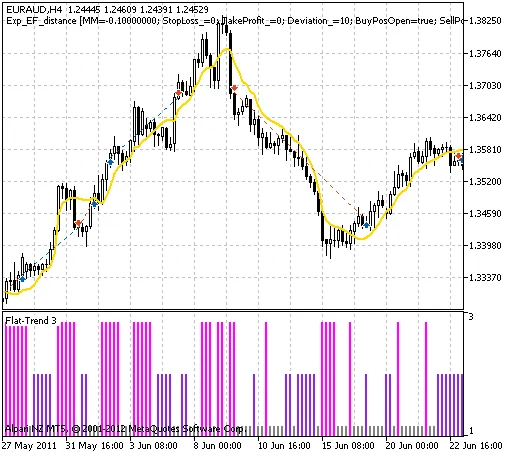
Fig. 1. Historical deal instances displayed on the chart.
Here are the testing results for 2011 on the EURAUD H4 timeframe:
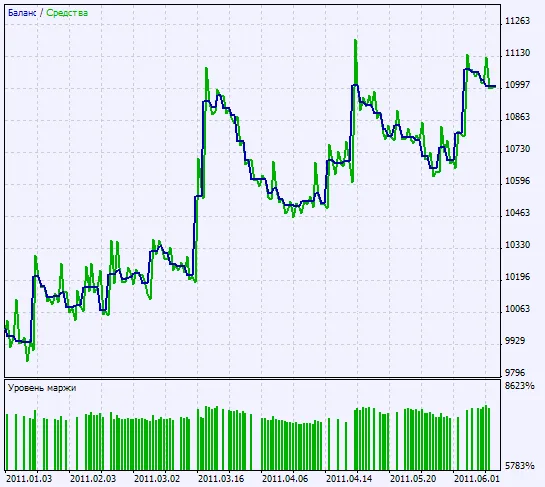
Fig. 2. Chart displaying testing results.




Comments 0