
Hey there, fellow traders! Today, we're diving into an exciting trading system based on the TimeZone Pivots Open System. This nifty indicator signals trades with the added flexibility of setting a fixed position holding time. What’s great about this system is that you’ll get a signal when a bar closes, particularly if there’s a channel breakout. Once your set holding time is up, the position closes automatically. Let’s break it down:
inputbool TimeTrade=true; // Enabling time-based position exitinputuint nTime=1500; // Holding time in minutes
To ensure the generated EA runs smoothly, make sure you have the compiled TimeZonePivotsOpenSystem.ex5 file saved in your <terminal_data_directory>\MQL5\Indicators folder. This trading system is an enhancement of the Exp_TimeZonePivotsOpenSystem EA, adding the capability to hold positions for a specified time.
The EA is designed to work on timeframes up to M30:
inputENUM_TIMEFRAMES InpInd_Timeframe=PERIOD_M30;// TimeZone Pivots Open System indicator timeframe
For the tests shared below, we used the default input parameters of the Expert Advisor. Keep in mind that no stop loss or take profit levels were implemented during these tests.
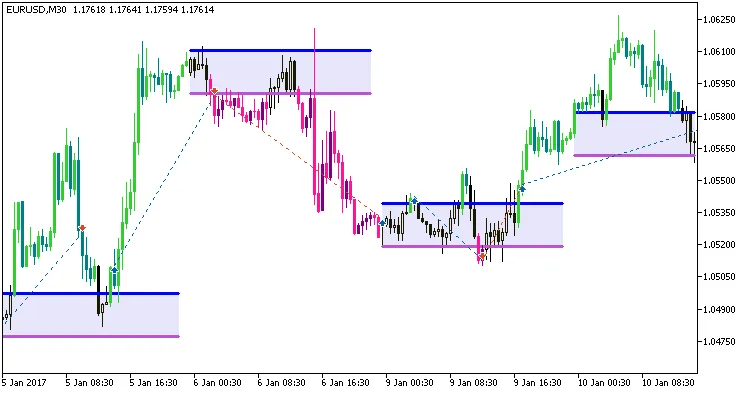
Fig. 1. Examples of trades on the chart
Now, let’s take a look at the testing results for EURUSD on the M30 timeframe for the year 2017:
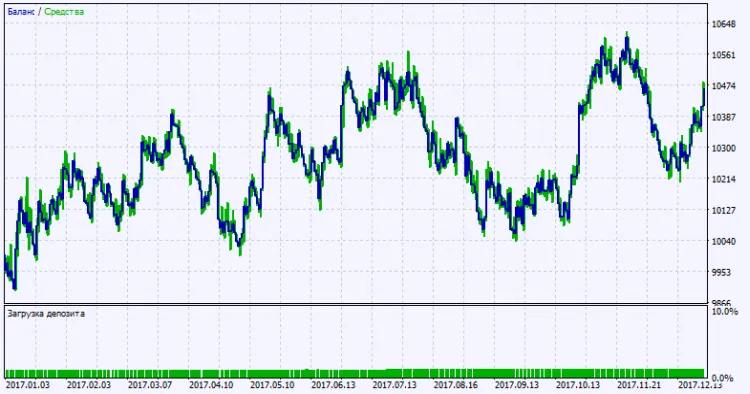
Fig. 2. Test results chart




Comments 0