
Hey traders! Let’s dive into the world of automated trading with a tool that’s as straightforward as it gets: the Narrowest Range Signal Expert Advisor (EA) for MetaTrader 5.
- When the indicator signals form at the upper and lower boundaries of the range, it sets up Buy-Stop and Sell-Stop orders. You can specify your Take Profit in the input parameters, while the Stop Loss is set at the opposite boundary of the range.
- If no orders are triggered and a new signal comes in, the previous orders will be canceled, and new orders will be placed based on the latest signals.
- Once one of the orders is executed, the opposite order is removed. Your open position will either close at the Stop Loss or Take Profit. Just a heads up—while you have an active position, the indicator won’t check for new signals.
To get started, download and install the Narrowest Range Signal in the MetaTrader 5/MQL5/Indicators folder.
Here are the key parameters you’ll want to set:
- Bars in Range - This defines how many bars are used to calculate the range (including the current bar).
- Check Period - This is the timeframe for detecting the minimum range.
- Order Indent from High / Low - This specifies how far in pips from the upper and lower boundaries of the range your stop orders will be placed.
- MM Mode - Choose your money management mode: either fixed lot or a fixed percentage of your free margin (essentially a percentage of your deposit).
- Volume (Lot or percent) - This sets your order volume, which will depend on the previous parameter—either in lots or as a percentage.
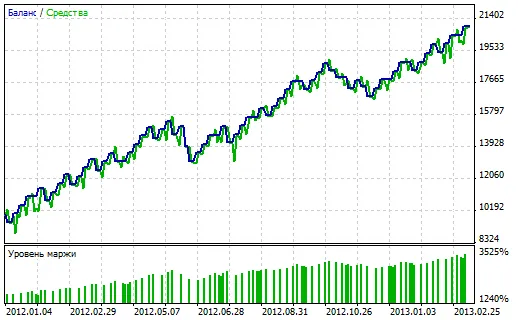
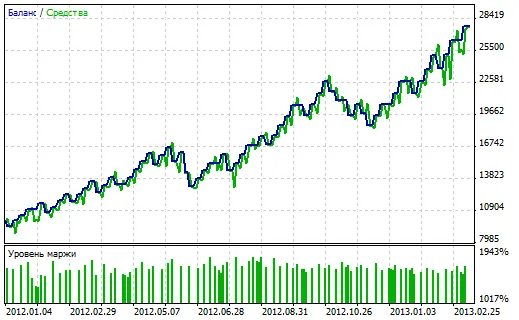
Now, let’s look at some testing results for the EURUSD on the H4 chart, from January 2012 to now (March 2013), starting with a deposit of $10,000:
1. Fixed lot (0.5):
2. Fixed percentage (5%):
Important Notes:
- Both test results are included in the archive for your review.
- This version of the EA is more about validating the concept rather than being a full-fledged trading tool for live accounts. In simpler terms, it works fine in real-time, but it doesn’t validate its own orders or the accuracy of Take Profit and Stop Loss settings (assuming you’re trading on larger timeframes where Stop Loss can’t be less than the stop level, so avoid setting too tight Take Profits).




Comments 0