
Welcome to the world of trading! Today, we’re diving into a system that leverages the Directed Movement Candle indicator for generating actionable trade signals. This system is straightforward: when the indicator candlesticks switch colors from blue to pink, or vice versa, it’s time to consider placing a trade.
To get started, download the Directed_Movement_Candle.ex5 and Directed_Movement.ex5 files and drop them into your <terminal_data_folder>\MQL5\Indicators directory.
One handy feature of this setup is the TradeAlgorithms.mqh library file. This allows you to run Expert Advisors with brokers that offer a non-zero spread. Plus, you can set your Stop Loss and Take Profit at the same time you open a position. If you’re interested in exploring more versions of this library, check out this link: Trade Algorithms.
The default input parameters for the Expert Advisor were utilized in the tests below. Notably, neither Stop Loss nor Take Profit settings were applied during the testing phase.
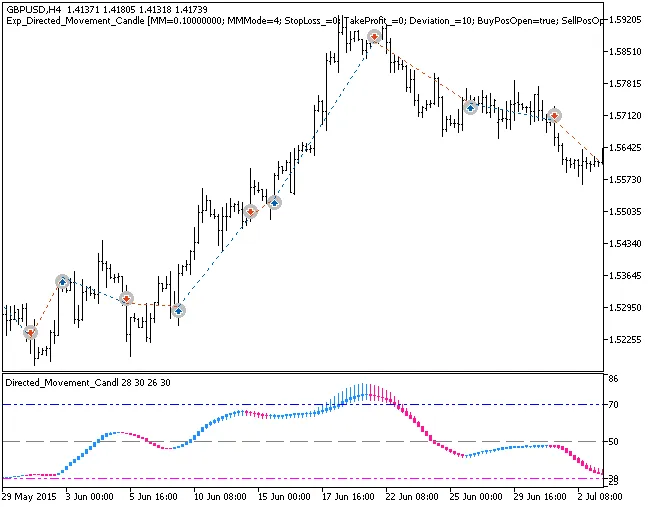
Fig. 1. The instances of history of deals on the chart.
Let’s take a look at the test results for 2015 using the GBPUSD on the H4 timeframe:
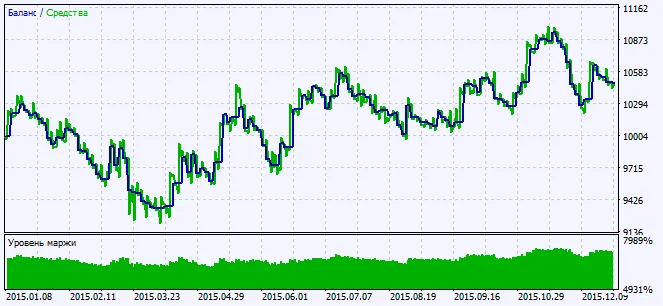
Fig. 2. Testing results chart




Comments 0