
Are you looking for an edge in your trading? Meet the ForexProfitBoost_2nb_HTF_Signal indicator, designed to show you the trend direction or signals generated by the ForexProfitBoost_2nbSign indicator right at the selected bar. This handy tool not only visualizes market trends with colored arrows but also alerts you with audio signals when it’s time to act.
When the trend continues at your chosen bar, you'll see a right arrow pop up, colored to match the trend direction. If there’s a shift in the trend, the indicator will display a diagonal arrow, indicating both the color and direction of the trade you should consider.
Let’s break down the input parameters you need to know:
- ForexProfitBoost_2nb Input Parameters:
inputstring Symbol_="";           // Financial assetinputENUM_TIMEFRAMES Timeframe=PERIOD_H6;         // Indicator timeframe for calculation
//---- Moving Average 1 parameters
inputuint   MAPeriod1=7;
input  ENUM_MA_METHOD   MAType1=MODE_EMA;
inputENUM_APPLIED_PRICE   MAPrice1=PRICE_CLOSE;
//---- Moving Average 2 parameters
inputuint   MAPeriod2=21;
input  ENUM_MA_METHOD   MAType2=MODE_SMA;
inputENUM_APPLIED_PRICE   MAPrice2=PRICE_CLOSE;
- Visualization Settings:
//---- Indicator visualization settingsinputuint SignalBar=0; // Bar number for getting a signal (0 is the current bar)inputstring Symbols_Sirname=INDICATOR_NAME"_Label_"; // Indicator label namesinputcolor Upsymbol_Color=clrBlueViolet; // Uptrend symbol colorinputcolor Dnsymbol_Color=clrMagenta; // Downtrend symbol colorinputcolor IndName_Color=clrDarkOrchid; // Indicator name colorinputuint Symbols_Size=60; // Signal symbols sizeinputuint Font_Size=10; // Indicator name font sizeinputint X_1=5; // Horizontal name offsetinputint Y_1=-15; // Vertical name offsetinputbool ShowIndName=true; // Displaying the indicator nameinputENUM_BASE_CORNER WhatCorner=CORNER_RIGHT_UPPER; // Corner for symbol displayinputuint X_=0; // Horizontal offsetinputuint Y_=20; // Vertical offset
- Alert Settings:
//---- Alert settingsinput ENUM_ALERT_MODE alert_mode=OnlySound; // Indication trigger optionsinputuint AlertCount=0; // Number of alerts
If you want to use multiple instances of the ForexProfitBoost_2nb_HTF_Signal on the same chart, make sure each has its own unique Symbols_Sirname (indicator label name) to avoid any confusion.
Before you dive in, ensure that you have the compiled indicator file ForexProfitBoost_2nbSign.mq5 placed in your <terminal_data_folder>\MQL5\Indicators\ directory.
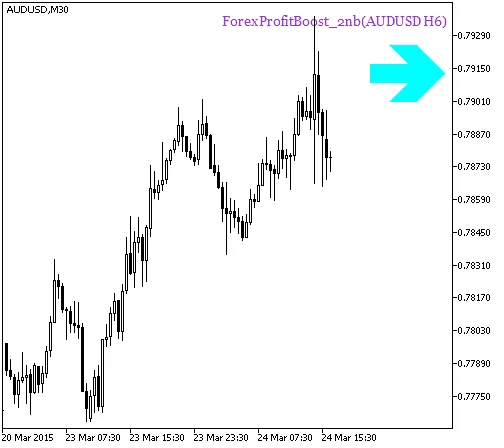
Fig. 1. The ForexProfitBoost_2nb_HTF_Signal indicator. A signal of trend continuation
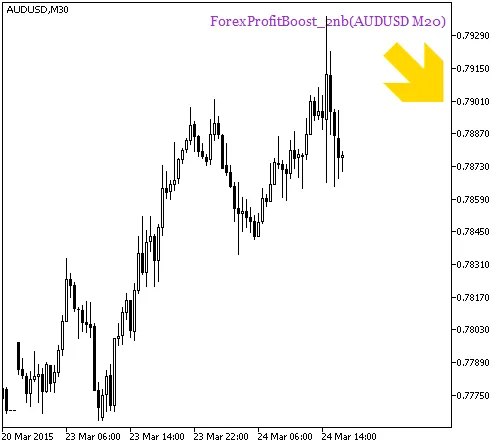
Fig. 2. The ForexProfitBoost_2nb_HTF_Signal indicator. A signal for a deal




Comments 0