
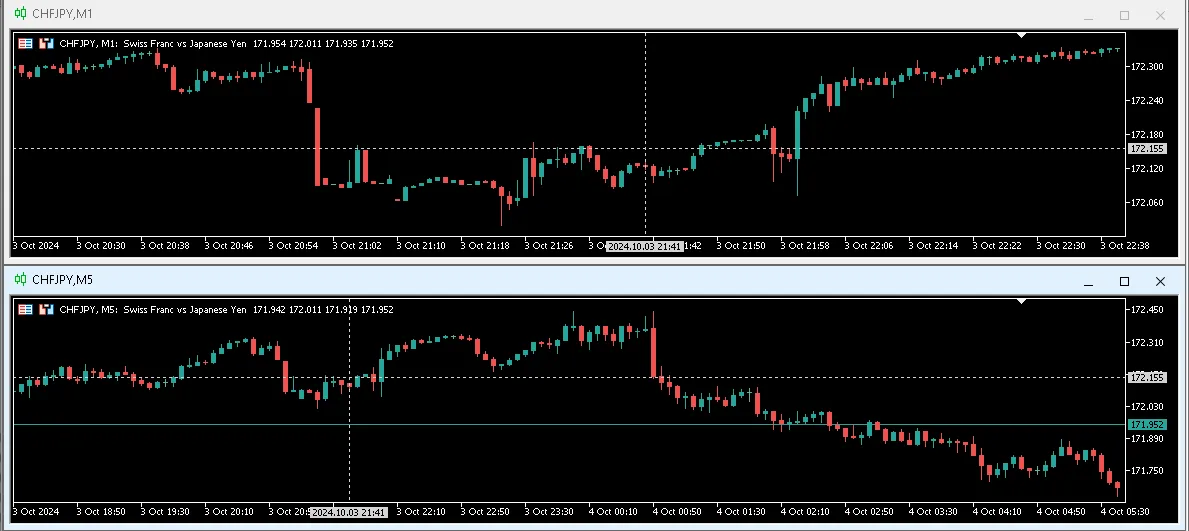
If you're a trader who loves to analyze multiple timeframes, then a custom crosshair cursor is a game changer for locating those key candles of interest. This nifty tool not only helps you pinpoint your trades but also gives you the option to convert server time into your local time, neatly displayed as a tooltip.
Need to reposition the cursor? No problem! Just hold down the [Ctrl] or [Shift] key while moving your mouse over the chart, and you'll effortlessly reposition the custom crosshair. If you want to hide or show the cursor, simply hit the [Esc] key.
Latest Update (November 20, 2024)
Now, the custom crosshair cursor remembers its hidden/show state, even after restarting the indicator.
Here’s a quick rundown of the indicator parameters:
- Show Local Time: Displays local time as a tooltip for easy reference.
- Cursor Color: Choose your preferred color for the crosshair cursor.
- Cursor Name: Synchronizes the same cursor name using the terminal's global variable for consistency.
Happy trading!




Comments 0