
Hey fellow traders! If you’re looking for a way to tweak your technical indicators without the usual hassle, let me introduce you to an amazing tool: sliders in MetaTrader 4 (MT4). With these nifty sliders, you can adjust the period and other values quickly and easily right from your chart window. No more fumbling around in the input window or taking your eyes off the charts!
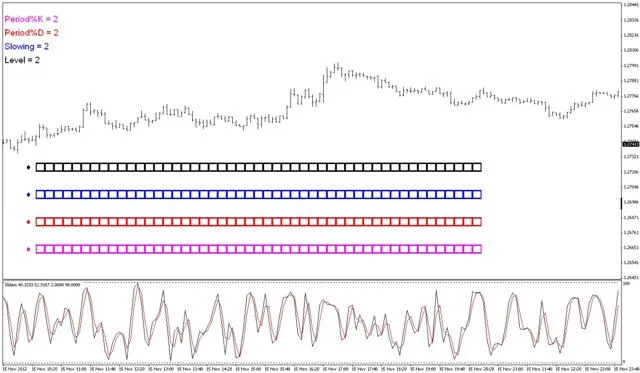
Each slider features up to 50 separate boxes arranged in a line across your chart. Each box represents a value, and you can use a circular marker (or token) to select your desired value. Once you choose, that value gets applied to your indicator in a separate window, and voilà! Your indicator updates automatically. Best of all, this feature uses MT4 chart objects without the need for any DLLs.
Now, let’s dive into the customization options. You can choose how many sliders to display (up to 4), set your starting and ending values for each slider, and determine the increment between values (again, up to 50 boxes per slider). Plus, you can customize the description and color for each slider, decide how many bars to count in the indicator, and even choose whether to display the X and Y coordinates of the first marker. And yes, the slider values can include decimals and negative numbers!
The chart objects appear as labels that stick to your window. Their positions are controlled using X and Y coordinates, which can be easily adjusted in the code (and a quick re-compilation will do the trick).
The default indicator set up with this is the Stochastic. If you want to use a different indicator, just enter the relevant code between lines 448-451 and swap out one of the parameters with your new slider array. It’s that straightforward!
Want to display an indicator right on the chart window? No problem! Just change line 34 to #property indicator_chart_window.
Just a heads up: the slider values update only once per tick. If you’re trying to use this during off-peak hours (like weekends), you’ll need to refresh the chart another way. One simple method is pressing Alt + C + R. Alternatively, you can use a script to post a “fake tick” to keep things moving. You can find more info about that here.
Author: cleric6 (a.k.a mimp)




Comments 0