
Welcome back, fellow traders! Today, we’re diving into the DynamicRS+Channel, a fantastic tool in the MetaTrader 4 arsenal that offers a fresh take on market analysis without the usual averaging methods.
This indicator stands out due to its straightforward design. Instead of relying on period analysis, it features a fixed channel that runs alongside the indicator line. While it initially incorporated period analysis, testing revealed that most signal formations occur at the channel’s edges.
How to Effectively Use the DynamicRS+Channel
- Identify the Trend: First and foremost, check the current trend on higher timeframes (TFs). This will give you a clearer picture of where the market is headed.
- Choose Your Timeframe: For smaller timeframes like M5, using an 8-point channel works wonders. This allows for quick trades, especially during corrections.
- Entry Points: Look to enter a trade just one point above the main line of the indicator for a Sell, or one point below it for a Buy. Aim for a target of around 10 points, or just one point beyond the channel.
- Pending Orders: It’s best to set pending orders with this indicator since it operates on a smaller timeframe. This helps you avoid missing out on trades due to slight delays.
- Stop Loss Placement: A smart strategy is to place your stop loss one point beyond the price channel (Donchian) with a period between 16 to 20. This keeps your risk minimal while allowing for potential profits.
While I haven’t tested this on higher timeframes yet, I’m currently working on optimizing a program that aims to generate 2-3 profitable trades daily with minimal risk. It’s all about finding that sweet spot where your strategy aligns with market movement.
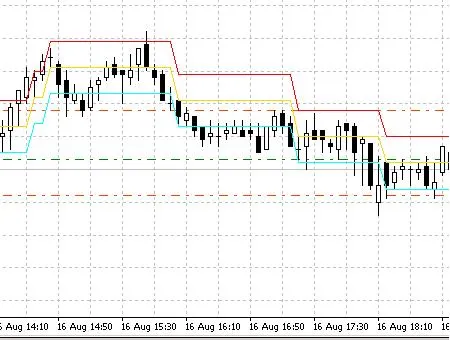
DynamicRS+Channel




Comments 0