
Welcome, fellow traders! Today, we're diving into the ind_aMU indicator for MetaTrader 4, a handy tool that helps you identify trend and lateral price movements with ease.
Understanding the Settings
Let's break down the adjustments you can make:
- period_fast - This is the period for calculating the fast moving average.
- period_slow - This refers to the period for the slow moving average calculation.
- ma_shift - This determines how the indicator is shifted relative to the price chart.
- ma_method - This is the method you choose for averaging.
Moving Average Methods
When it comes to moving averages, you have a few options, each with its own significance:
- 0 - SMA (Simple Moving Average).
- 1 - EMA (Exponential Moving Average).
- 2 - SMMA (Smoothed Moving Average).
- 3 - LWMA (Linear Weighted Moving Average).
Choosing Your Price Type
The applied_price setting lets you select the type of price you're working with, and here are your options:
- 0 - CLOSE: Closing price.
- 1 - OPEN: Opening price.
- 2 - HIGH: Highest price.
- 3 - LOW: Lowest price.
- 4 - MEDIAN: Average price, calculated as (high + low) / 2.
- 5 - TYPICAL: Typical price, calculated as (high + low + close) / 3.
- 6 - WEIGHTED: Weighted closing price, calculated as (high + low + close + close) / 4.
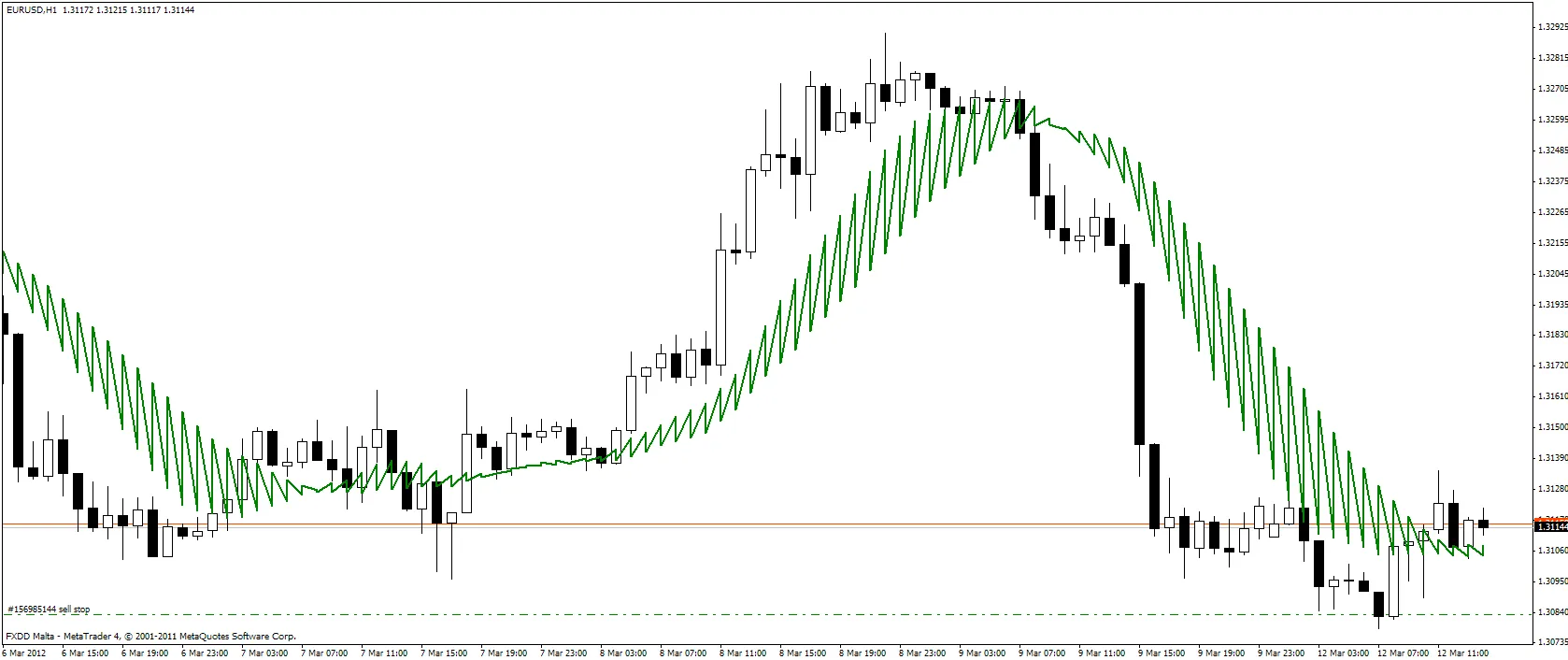
Using the ind_aMU indicator effectively can give you a solid edge in your trading strategy. Explore the settings, find what works best for you, and happy trading!




Comments 0