
If you're navigating the choppy waters of trading, the wd.Range_BB indicator is a handy tool to have in your kit. This custom indicator for MetaTrader 5 is designed to showcase Bollinger Bands with personalized colors and line styles right on your chart, while also calculating the range bandwidth. For those new to the term, the range bandwidth represents the difference in pips between the upper and lower Bollinger Bands.

How the wd.Range_BB Indicator Works
Here's the lowdown:
Bollinger Bands Settings:
With this indicator, you can tweak various parameters to customize the appearance and behavior of your Bollinger Bands. Feel free to adjust the period, shift, deviation, and applied price, as well as the visual elements like color and line style to suit your trading style.
Sub-Window Placement for Range/Bandwidth Info:
There's a specific input parameter that lets you choose where to place the labels for the bandwidth information. You can opt to display the distance between UpperBB and LowerBB either in the main chart or a designated sub-window. You can also adjust the label positions (X and Y coordinates) as needed.
To show labels on the main chart, just enter '0' in the 'Sub-Window placement' settings. If you want them in a Sub-Window below, simply use '1, 2, or 3' and so on. Just a heads-up: you'll need to attach the indicator wd.Multi_SubWindow for this to work. {wd.Multi_SubWindow.mq5 attached}
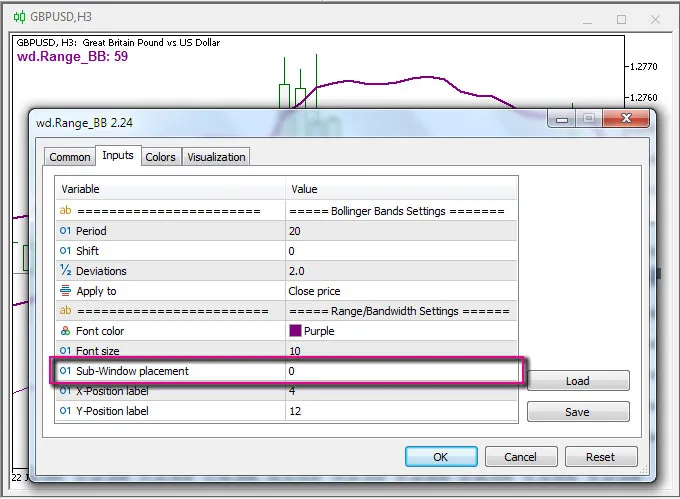
In a nutshell, the wd.Range_BB indicator not only displays the range bandwidth in a label but also plots the Bollinger Bands on the main chart. This nifty tool helps you visualize market flexibility and volatility based on the width of those bands, giving you an edge in your trading strategy.




Comments 0