
Special Features:
- Search for ZigZag (ZZ) breaks—only at the peaks or troughs of the approximating curve (I like to call it the Snake). We ignore other extremums since they’re not relevant.
- The ZZ is calculated on a larger timeframe (handled by the file SZZ_without_ZZ.mq4) and displayed on a smaller one (using SZZReader.mq4). This setup reduces the number of "redraws" and helps us skip unnecessary breaks, avoiding some artificial stop-level touches. Plus, it allows for better measurement of horizontal projections on the smaller timeframe.
- During formation, the ZZ section doesn’t pull back from the reached levels like the price does. Instead, it locks them in to keep the proportions of shape development intact. If there’s a turn, a new ZZ break will emerge at the latest reached level, and this "alternative" development gets fixed with a "rubber-band".
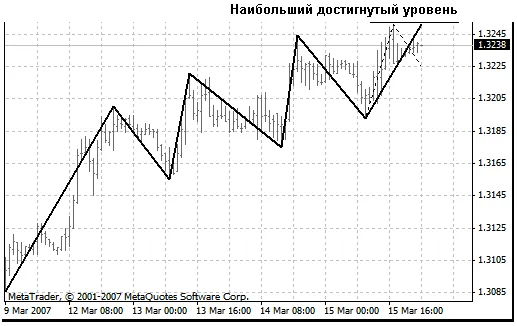
This setup allows us to track how patterns develop:
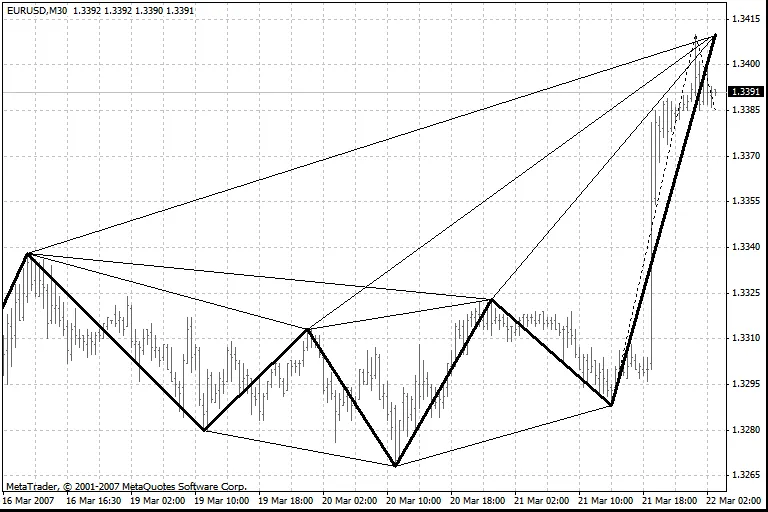
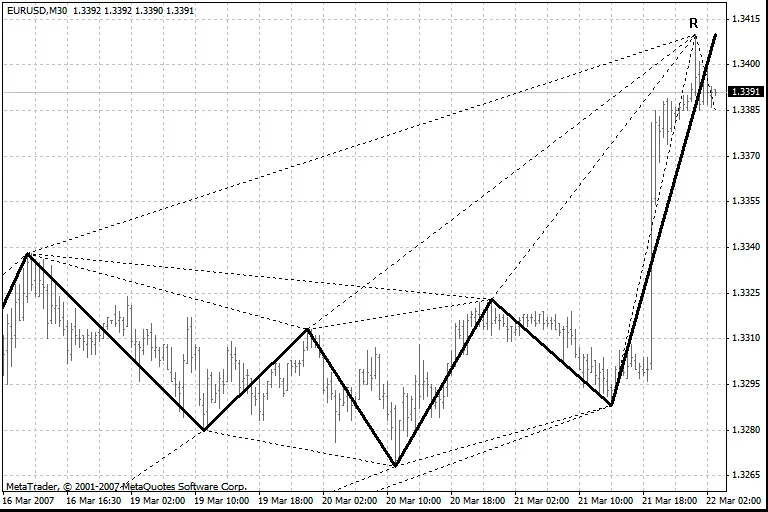
And, when we detect a possible new ZZ break, we can evaluate the likelihood of completing the pattern by comparing it with turning shapes:
To get started with the program, save both files, SZZ_without_ZZ.mq4 and SZZReader.mq4, in your indicators folder. Open them in MetaEditor and compile. These programs are designed for use in the Tester, but they should also work in real-time (fingers crossed!).
To use them, load SZZReader in your current window. The parameter SeniorTF sets the timeframe for ZZ calculation. Make sure there are quotes available from a larger timeframe to build ZZ on your selected one.
For instance, if you want to calculate ZZ on H1 and display it on M5, start SZZReader in the M5 window, specifying extern int SeniorTF = 60;.
Note: The attached indicators are basic; they only draw the ZZ itself and the "rubber-band". You won’t find templates for turning shapes, pattern search functions, or additional calculations between ZZ breaks in these indicators.




Comments 0