
Hey traders! If you're on the lookout for a straightforward yet super-fast ZigZag indicator, you've just struck gold!
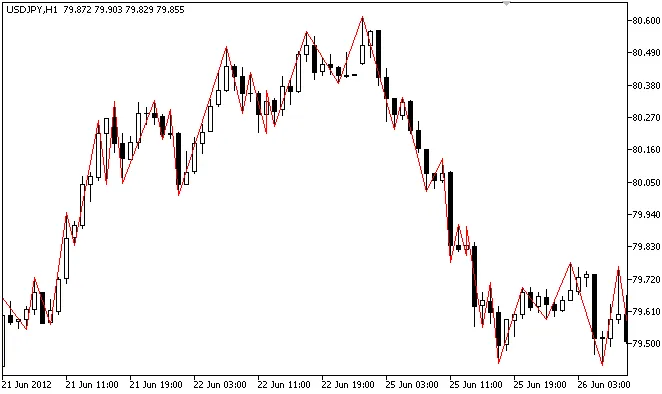
Why Choose the Ideal ZigZag?
Advantages:
- The critical function in calculations,
iBarShift, is completely replaced byArrayBSearch. This means you’ll enjoy a more efficient indicator compared to its MQL4 counterpart. - All essential data for each bar is available in real-time and accessible for any historical moment for your Expert Advisors.
- No laggy peaks here!
- It employs an efficient method for peak detection without hunting through indicator values.
- This indicator is lightning fast!
- It performs accurately when inserting historical data and switching between timeframes.
- Perfectly suited for use in trading systems.
Disadvantages:
- The memory requirements might raise an eyebrow. The ZigZag uses 2 buffers (one just doesn’t cut it due to lag issues), while this version employs 5 buffers. But honestly, the benefits far outweigh this slight drawback, especially since no other quick ZigZag can correctly manage historical inserts on just two buffers.
- Extra lines are included to make data visible to your Expert Advisor, but these lines are not meant to be displayed.
How Does It Work?
The ZigZag is drawn using the channeling principle. You can define the channel width in points (IdealZZ) or as a percentage (IdealZZP).
Code Snippet for Peak Retrieval:
inputint ChannelWidth=100;

#property indicator_chart_windowdatetime LastTime;
int ZZHandle;
//+------------------------------------------------------------------+
//| Custom indicator initialization function                          |
//+------------------------------------------------------------------+
voidOnInit()
  {
   LastTime = 0;
   ZZHandle = iCustom(_Symbol, Period(), "IdealZZ", ChannelWidth);
  }
//+------------------------------------------------------------------+
This is just a snippet to get you started. This indicator marks the first five peaks (including the one currently forming) once per bar.
Note: The code may misbehave if zero bar mode is enabled.
Zero Bar Mode:
This mode can be activated through the DrawZeroBar variable in the code, but it's off by default. It's best to leave it disabled, especially if you're utilizing the indicator with an Expert Advisor.
Happy trading! If you encounter any issues or have suggestions, don't hesitate to reach out. Let's keep improving together!




Comments 0