
If you’re diving into the world of indicator programming, you’ll want to get familiar with how to handle OnCalculate parameters. This handy utility is perfect for beginners looking to understand the values generated by the OnCalculate function and a few others.
Here’s what the indicator showcases:
- The latest value from the most recent OnCalculate call.
- The previous value from the last OnCalculate call.
- The first value recorded during the very first OnCalculate execution.
- The series values for each array—whether they’re treated as series or not—with a simple click to change the display.
With the release of Version 1.10, we’ve introduced the ability to dynamically toggle whether arrays are set as series or not. Just click on the text to switch it up! The Window Bars and First Visible Bar values will now also adjust with any chart changes. Plus, the ON/OFF display clearly indicates what will happen with your settings in the next OnCalculate execution compared to the last one.
Then, in Version 1.20, we’ve upped the ante! You can now easily choose to set the arrays to as_series or not_series, simply by clicking the text again. The indicator also neatly displays both ends of the time array and the iMA buffer, making it clear how as_series and not_series arrays differ. Even better, the display refreshes only when necessary using the OnTimeEvent handler, cutting down the OnCalculate execution time from around 300 ms to less than 1 ms! If you want to see the execution time, just un-comment the code in OnCalculate.
Check out this image showing what the OnCalculate_Values utility displays. You’ll see three distinct values separated by slashes: “Most Recent Value,” “Previous Value,” and “First Value.” The OnCalculate values are set to either 'as_series' or 'not_series' with each OnCalculate event. When Set Arrays is 'ON', they bypass the terminal’s default value. The value in brackets next to the array names indicates which bar the value originates from—either the index '0' value or the 'value at the maximum index.'

The code outlines a single indicator line that plots the Open price of each bar as provided by iMA. Its purpose is to serve as a buffer for using the "BarsCalculated" function and to illustrate how an indicator displays when set to 'as_series' or 'not_series.' Clicking on iMA_Val[0] toggles the iMA buffer between as_series and not_series, but it only does so once per click; the iMA indicator array doesn’t reset with every OnCalculate call.
We also have a collection of arrays that hold the properties of each display object (OBJ_LABEL) in the display:
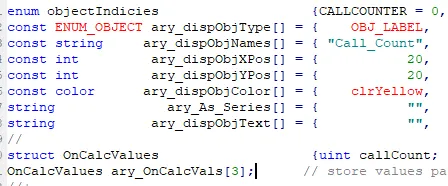
The "ArrayGetAsSeries" function helps determine whether the arrays in OnCalculate parameters are time series arrays or not, with the display clearly showing the result (As_Series or Not_Series). The initial state of these arrays is not series, and they can revert back to their default state after being set as series.
Lastly, the 3-member array, ary_OnCalcVals, stores the 1) Most Recent, 2) Previous, and 3) First values from the OnCalculate parameters. The CopyNewToOld and MoveNewTo functions take the current value for each display parameter and place it into the historical storage of ary_OnCalcVals.




Comments 0