
Check out the MT5 version here: Multi-Pair Pivot Point Scanner
Introducing the Multi-Pair Pivot Point Scanner: This powerful tool scans multiple currency pairs to alert you when the price crosses a pivot point or when it's within a specific range of the pivot. This way, you can stay ahead of the game and make informed trading decisions!
Tip: Keep the Scanner on a separate chart tab from your trading strategy for better clarity.
You can run multiple instances of the scanner on the same chart tab to catch alerts across different time frames.
Make sure to delete old updates and ensure your chart is running the latest version to avoid any buggy issues.
Remember: The symbols you want to scan must be in the Market Watch. If you get an error like "Can't find this symbol: AUDCAD," double-check your Market Watch settings and your prefix/suffix configurations.
Pivot Point Types
- Standard (Floor)
- Fibonacci
- Woodie
- Camarilla
All Pivot Point Timeframes
More Features
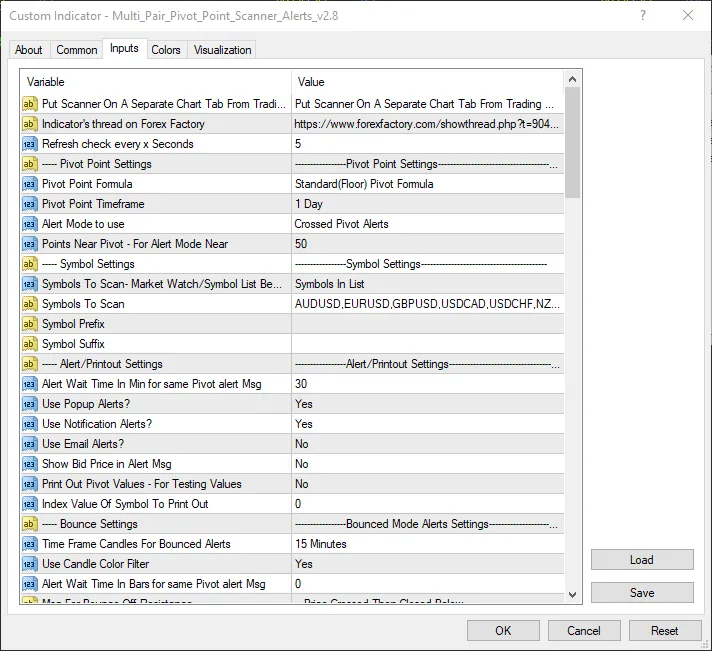
- Toggle alerts for pop-ups or mobile notifications.
- Set a wait interval for repeated alert messages.
- Enable or disable daily, weekly, or monthly pivot point cross alerts.
- Customize symbol prefixes and postfixes (leave blank if not needed).
- Choose which pivot points to receive alerts for.
- Get alerts when price is near a pivot point.
- Receive notifications when price bounces off a pivot point.
- Scan symbols directly from the Market Watch instead of a predefined list.
- Utilize Bollinger Bands for upper and lower filter alerts.
For setting up email notifications in MT4, check out these instructions: MT4 Email Setup
For mobile notifications in MT4, follow this guide: MT4 Notification Setup
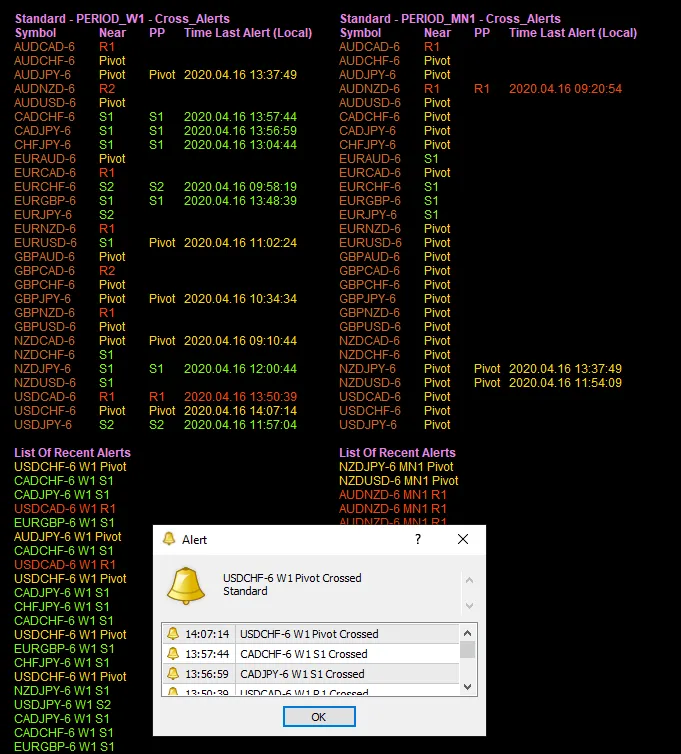
Inputs/Alert Message Example
Here are some visuals to help you understand how it works:





Comments 0