
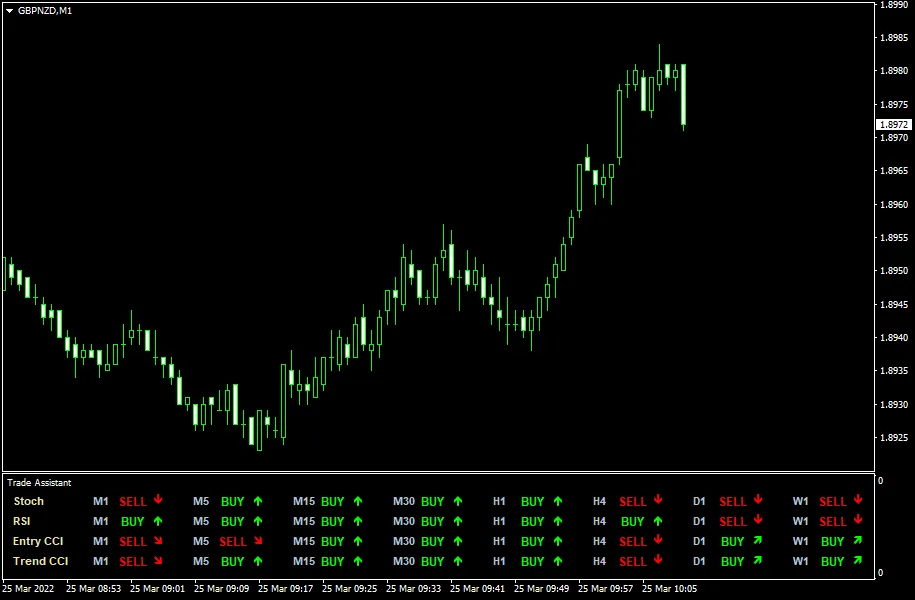
Trade Assistant MT4 Indicator is a powerful multi-timeframe tool designed to enhance your trading experience. Built on the foundations of three widely used indicators—the Stochastic Oscillator, RSI (Relative Strength Index), and CCI (Commodity Channel Index)—this indicator provides a comprehensive view of trend directions across various timeframes, including M1, M5, M15, M30, H1, H4, D1, W1, and MN1. No matter which timeframe you attach this indicator to, you'll have a crystal-clear picture of the market trends.
Key Features
The Trade Assistant can be seamlessly downloaded for both MT4 and MT5 platforms, making it incredibly versatile for traders at all levels.
Input Parameters
- CheckCandle (default = Previous) — This setting determines which candle to check for indicator values, applicable for both display and alerts.
- PercentK (default = 8) — The number of bars used to calculate the %K line of the Stochastic indicator.
- PercentD (default = 3) — The number of bars used to calculate the %D line of the Stochastic indicator.
- Slowing (default = 3) — This value controls the slowing of the Stochastic indicator.
- RSIP1 (default = 14) — The period for the first RSI (fast).
- RSIP2 (default = 70) — The period for the second RSI (slow).
- Enable (default = false/true) — Set this to true to allow the Trade Assistant to calculate and display signals for the specified timeframe.
- EnableNativeAlerts (default = false) — When set to true, a native MetaTrader popup alert will trigger when a confluence of signals appears for any timeframe.
- EnableEmailAlerts (default = false) — If true, you'll receive an email notification when a confluence of signals is detected. Ensure your email settings are correctly configured in MetaTrader via Tools -> Options -> Email.
- EnablePushAlerts (default = false) — Similar to email alerts, this sends a notification to your mobile device when signal confluence occurs. Check your notification settings in MetaTrader via Tools -> Options -> Notifications.
- Other parameters — Customize symbol codes for trend direction arrows and colors to suit your preferences.




Comments 0