
Understanding the Power of CAD with the Average Indicator
Welcome, fellow traders! Today, we’re diving into a powerful tool for your trading arsenal—the Average Indicator for CAD. If you’re looking to enhance your trading strategies in MetaTrader 4, you’re in the right place!
Version 229.201
This latest version of our Average Indicator delivers critical insights into the relative strength of the CAD currency. The zero line (0.0) serves as the average for the period you select using the AveragePeriod variable.
What does this mean for you? The indicator computes values based on closing prices from seven pairs involving CAD, providing a comprehensive view of its strength in the market.
To make your analysis even easier, we’ve incorporated a colored histogram that simplifies market interpretation.
Choose Your Trading Mode
You now have two modes to select from:
- TREND
- COUNTER-TREND
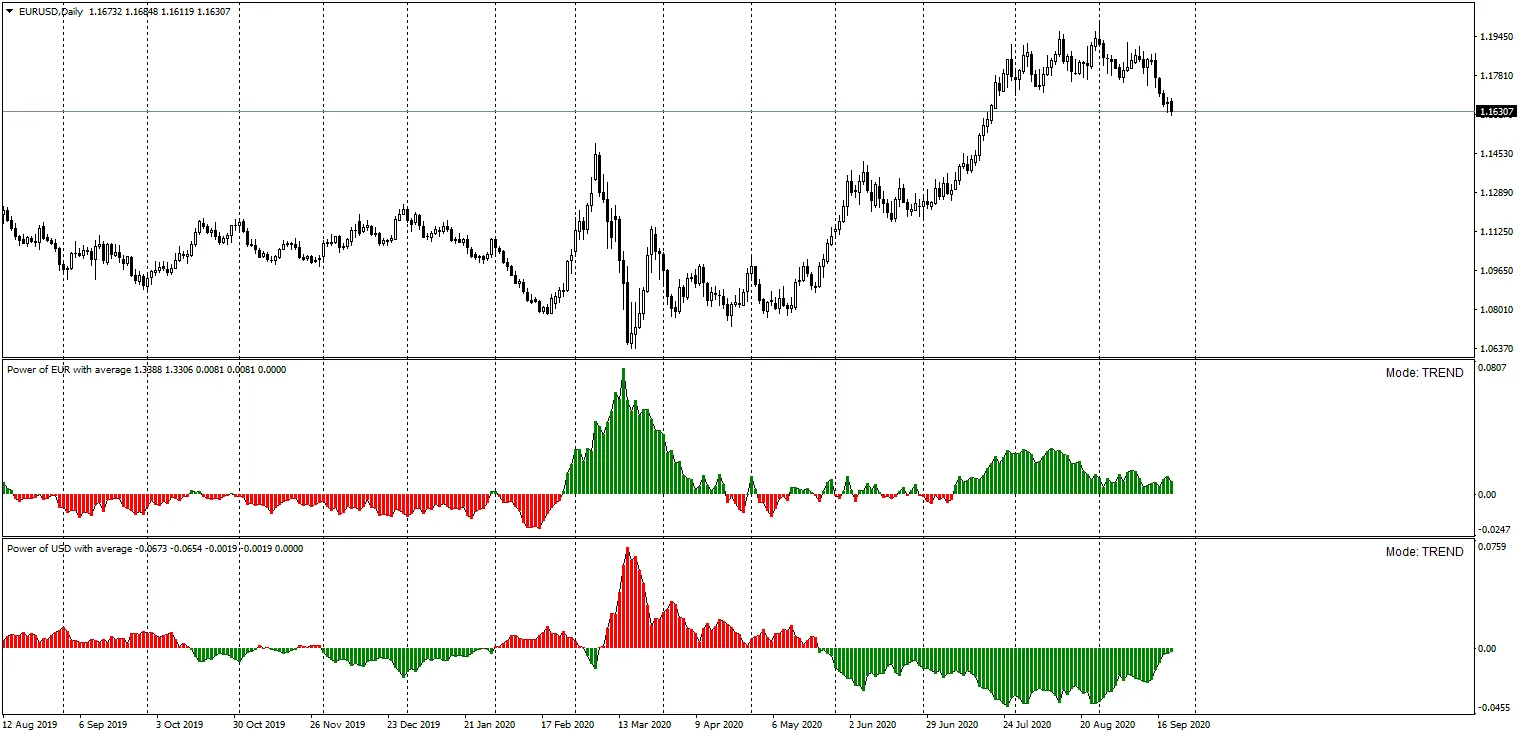
When the BASE and QUOTE currencies are highlighted in the same color, it signals a stronger opportunity to trade in the correct direction. Let’s break it down with some examples.
Example 1: BUY Signal
Currency Pair: EUR/USD
In this instance, you’ve opted for the TREND mode for both Power of EUR and Power of USD. If both indicators light up in GREEN, it’s your cue to BUY the EUR/USD pair!
Example 2: SELL Signal
Currency Pair: EUR/USD
For this scenario, again in TREND mode, if both Power of EUR and Power of USD show a RED signal, it’s time to SELL the EUR/USD pair.




Comments 0