
Introduction to Exp_DecEMA
The Exp_DecEMA Expert Advisor (EA) is designed to capitalize on the reversal signals from the DecEMA moving average. Essentially, it waits for a bar to close and looks for a shift in the indicator's direction to generate a trading signal.
Getting Started
To use this EA effectively, you’ll need the compiled indicator file DecEMA.ex5. Make sure to place it in your <terminal_data_folder>\MQL5\Indicators directory.
Trade Algorithms and Features
One of the standout features of this EA is its compatibility with brokers that offer nonzero spreads. It also allows you to set your Stop Loss and Take Profit right when you open a position. If you’re looking for more variations of the library, you can download them from this link: Trade Algorithms.
Testing Insights
During the tests outlined below, we used the default input parameters for the EA, and it’s worth noting that Stop Loss and Take Profit were not applied in these tests.
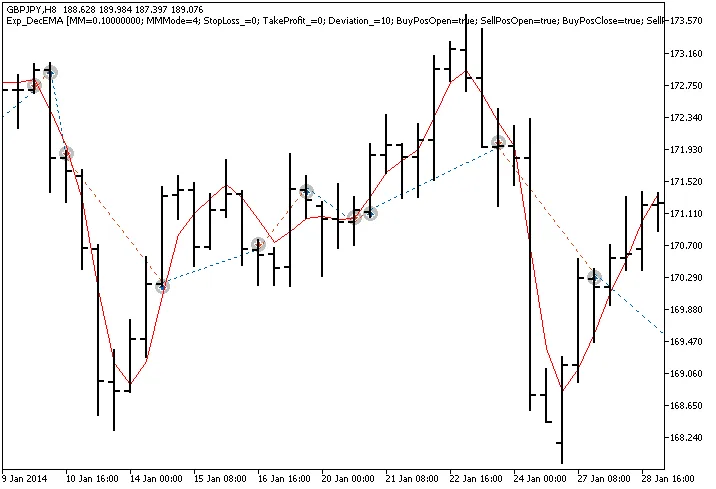
Fig.1. Trade examples on the chart
Testing Results for GBPJPY H8
Let’s take a look at the testing results for 2014 using the GBPJPY on the H8 timeframe:
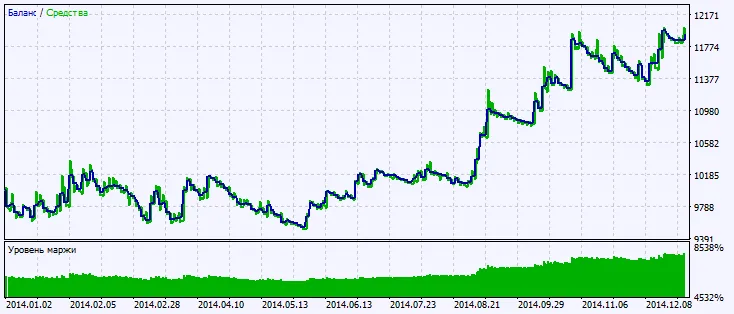
Fig.2. Testing results chart




Comments 0