
Welcome to the world of manual hedging! Today, we’re diving into an advanced hedging system designed for traders who prefer to take the reins of their trading journey. This handy tool in MetaTrader 4 offers you buy, sell, and stop buttons, making it easier to manage your trades effectively.
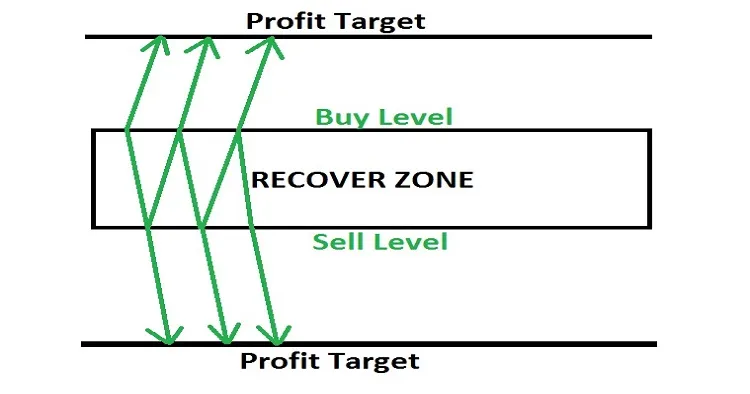
Whenever you hit the "Start" button, a series of trades kicks off. If the market turns against you by a specific number of pips, you can open an opposite trade with a slightly larger lot size to mitigate losses.
Key Features to Keep in Mind:
- It’s always a good idea to test on a demo account first.
- The interface is user-friendly with clear buy, sell, and stop buttons.
- If the market continues in the new direction, at some point, the profit from the winning trade will surpass the loss from the losing trade, allowing you to close both.
- If the market reverses, the trade with the larger lot size will accumulate losses quicker than the initial trade making profit.
- In such cases, calculate and open another trade in the original direction, ensuring that the combined size of the first and third trades is greater than the second.
- This back-and-forth hedging strategy can be repeated up to six times, until the market reaches a level that allows for profit or at least breaking even.
Input Settings:
- Use_TP_In_Money: Activate Take Profit in Money (values: true/false).
- TP_In_Money: Take Profit in Money (values: 10-100).
- Use_TP_In_percent: Activate Take Profit in Percent (values: true/false).
- TP_In_Percent: Take Profit in Percent (values: 10-100).
- Enable_Trailing: Enable Trailing with money (values: true/false).
- Take Profit In Money: in current currency (values: 1-100).
- Stop Loss In Money: in current currency (values: 1-100).
- TakeProfit: values: 100-200.
- Zone_Recovery_Area: values: 50-80.
- Period1: Fast Moving Average (values: 10-50).
- Period2: Slow Moving Average (values: 100-200).
- Multiplier: Multiplier for lot size (values: 0.01-1).
Now that you’ve got the basics down, why not give it a go? Remember, practice makes perfect! Check out the image below for a visual guide:




Comments 0