
If you're diving into the world of trading, you're probably always on the lookout for reliable systems and strategies. One such system that’s been making waves is the NRTR_ATR_STOP indicator. This system is designed to generate trading signals based on specific market conditions, and today, I'm excited to share how you can leverage it within MetaTrader 5.
So, how does it work? The NRTR_ATR_STOP system relies on visual signals that form at the close of a bar. You’ll know when to take action when you see a prominent colored star appear on your charts. It’s straightforward and intuitive, making it easier for traders of all levels to grasp.
To get started, you’ll need the compiled indicator file, NRTR_ATR_STOP.ex5. Make sure you save this file to your <terminal_data_folder>\MQL5\Indicators directory. This step is crucial for the Expert Advisor (EA) to function correctly.
Another critical element to keep in mind is the TradeAlgorithms.mqh library. This handy resource allows your EAs to operate seamlessly with brokers who provide a nonzero spread. Plus, you can set your Stop Loss and Take Profit right when you open a position. For more options, check out the Trade Algorithms library.
During testing, we utilized the default input parameters of the EA. Notably, we didn’t employ Stop Loss or Take Profit during these tests, which offers a clear view of the system's potential. Below are some results from our testing on GBPUSD in 2015:
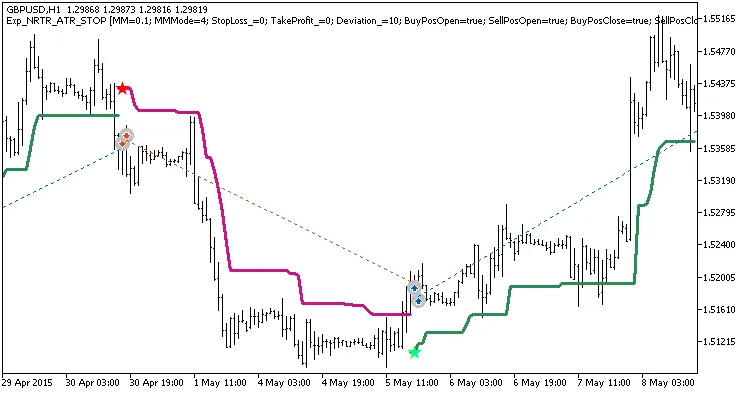
Example trades on the chart
Here’s a snapshot of the testing results:
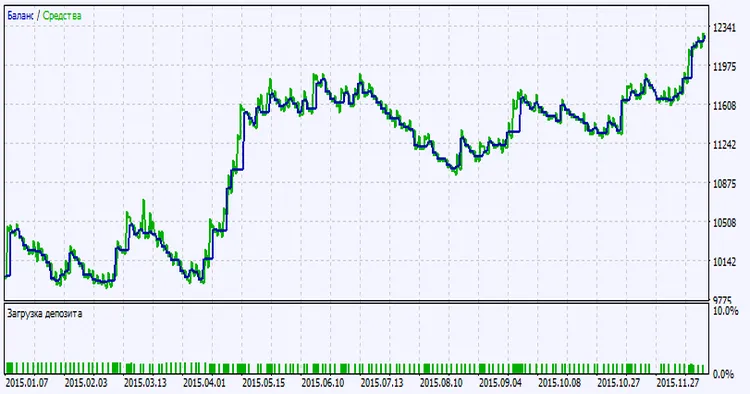
Testing results chart




Comments 0