
Welcome to the next level of trading! Let’s dive into the latest version of the MA MACD Position Averaging EA. This upgrade includes a nifty feature that allows for a trading signal reversal right when you first open a position—perfect for those moments when the market throws you a curveball.
What’s great about this EA is that it only checks for trading signals or adds to your position when a new bar appears. This means you can trade with confidence, knowing that it’s keeping an eye on the market for you.
At its core, the EA utilizes two powerhouse indicators: the iMA (Moving Average) and the iMACD (Moving Average Convergence/Divergence). If your current position is losing more than the Step Lossing pips, this EA will open an additional position in the same direction as the loss, adjusting the lot size based on the Lot Coefficient.
You can operate with either a single position or multiple positions in the same direction, giving you the flexibility to tailor your strategy. The EA comes with two key parameters: Indent Price from MA and Ratio of MAIN to SIGNAL, both illustrated in the image below.
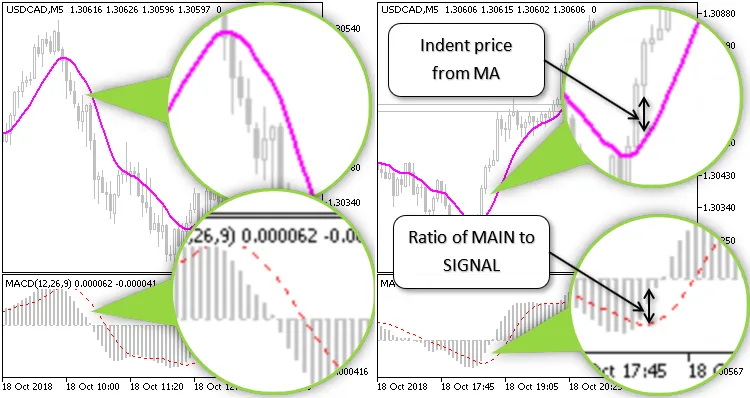
For a sample BUY signal, you’ll want the MACD indicator to be below "0.0", the main line (MAIN) to exceed the signal line (SIGNAL), and the current price to be above the Moving Average. Two filters enhance this condition:
- Ratio of MAIN to SIGNAL
- Indent Price from MA
You can also choose which bar to analyze—whether it’s the current bar or the one just before it—thanks to the Bar Current parameter.
How the EA Works
Each time a new bar forms, the EA collects data on the number of BUY and SELL positions, including the most significant loss (in pips) for each type. If it detects both BUY and SELL positions simultaneously, it considers it an error and closes all open positions to minimize risk. If a position is losing more than the defined Step Lossing pips, it remembers the details of that position (ticket and lot size) for further action.




Comments 0