
If you're looking to enhance your trading game, let me introduce you to a powerful system: the TrendMagic indicator. This tool is designed to help you make informed trading decisions by monitoring changes in market direction.
Whenever the TrendMagic indicator shifts its direction, it's your signal to act. To get started with the EA, make sure to place the compiled indicator file TrendMagic.ex5 into your terminal data folder under MQL5 > Indicators.
One of the standout features of this system is its compatibility with brokers offering nonzero spreads. The TradeAlgorithms.mqh library file allows you to utilize Expert Advisors while also enabling the simultaneous setup of Stop Loss and Take Profit orders right when you open a position. If you're interested in exploring more variations of this library, check it out here: Trade Algorithms.
During the tests that follow, we utilized the default input parameters for the Expert Advisor. It's worth noting that neither Stop Loss nor Take Profit was applied during these tests.
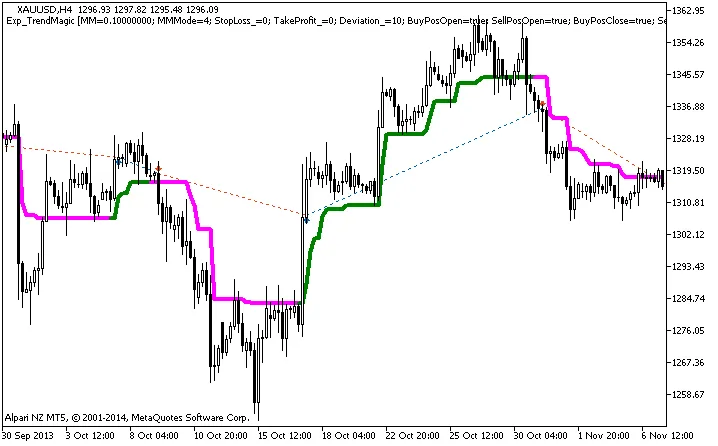
Figure 1: History of deals represented on the chart.
Now, let’s dive into the testing results for XAUUSD on H4 for the year 2013:
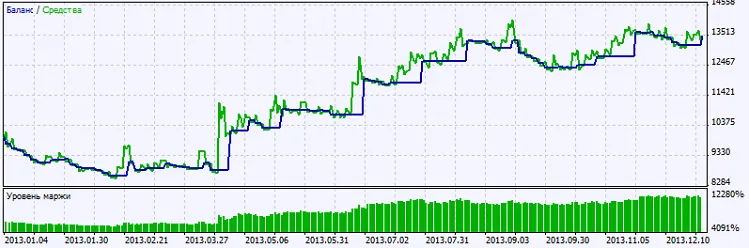
Figure 2: Overview of testing results.




Comments 0