
Introducing NeuroNirvamanEA 2! This is the next evolution of the original NeuroNirvamanEA. The updated EA now features a customizable trading time window, allowing you to set your trading hours from Start Hour:Start Minute to End Hour:End Minute.
This trading system leverages a straightforward neural network. It’s similar to the code behind MTC Combo, providing you with powerful trading capabilities.
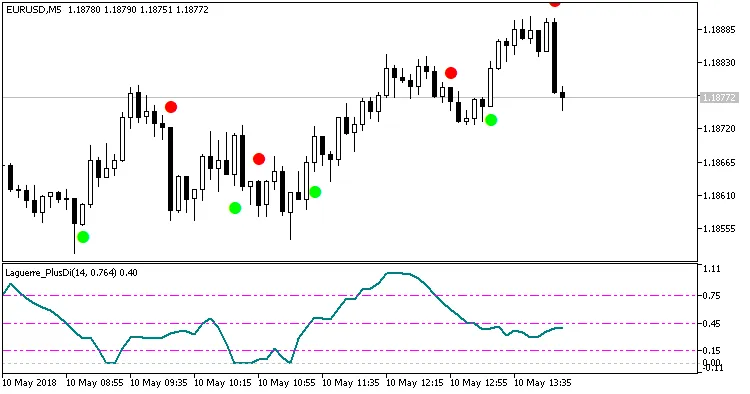
The EA incorporates two key indicators: Laguerre_PlusDi (shown in a separate window) and SilverTrend_Signal (displayed on the main chart):
All optimization steps should be conducted in "1 minute OHLC" mode.
Step 1
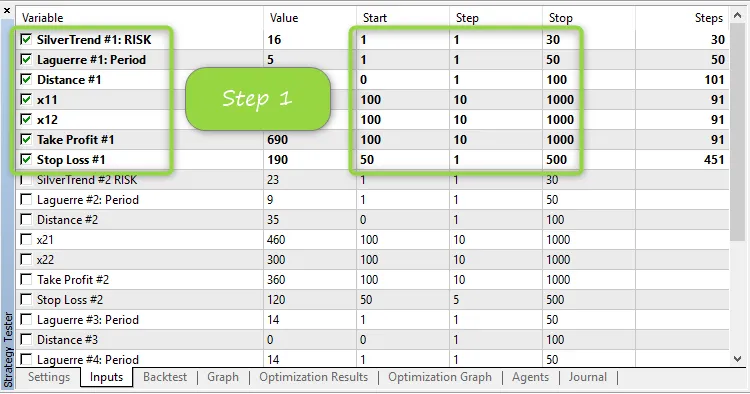
Set the parameter Pass to 1—this is crucial. During this step, ensure you're optimizing the parameters (take note of the columns for "Start", "Step", and "End")
Step 2
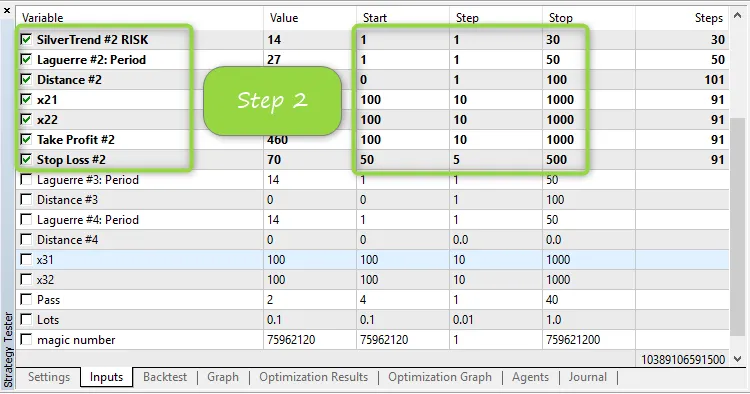
Set the parameter Pass to 2—this is vital. Uncheck all parameters that were optimized in Step 1. In this step, focus on optimizing new parameters (again, pay attention to the "Start", "Step", and "End" columns).
Step 3
Set the parameter Pass to 3—this is essential. Uncheck all parameters that were optimized during Step 2. Focus on the new parameters for this final optimization step (and yes, keep an eye on the "Start", "Step", and "End" columns).

Once you finish optimizing, set the Pass parameter back to 3 and uncheck the parameters optimized in Step 3. Your EA is now ready to hit the markets!




Comments 0