
The Kloss Expert Advisor has been expertly rewritten from MQL4 by Klopka. You can check out the original source here.
How It Works
Kloss utilizes three key indicators: the Moving Average (MA), CCI, and Stochastic.
Here’s the gist:
- When CCI dips below a certain level, Stochastic is also low, and the price is above the MA, it's time to buy.
- Conversely, when CCI rises above a certain level, Stochastic is high, and the price falls below the MA, it’s a sell signal.
Check out the results in the images below:
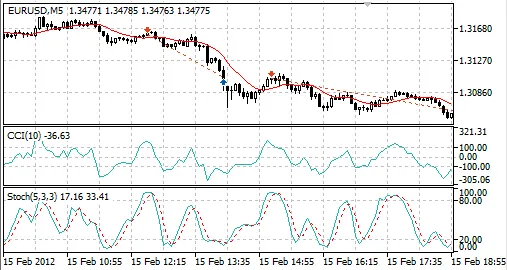
Fig. 1. Trades in the Expert Advisor tester. Notice how the sell occurred above the MA, showing a different shift between the MA and price.
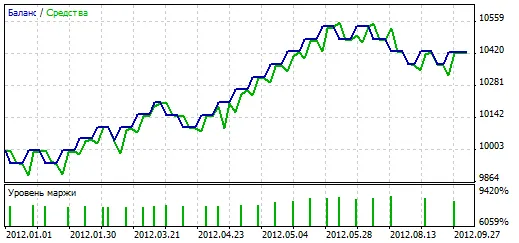
Fig. 2. Performance results of the Expert Advisor over the past year (2012) on EURUSD H1.
Key Parameters
- Lots: Size of the trade. Set to 0 for the MaxrR parameter to kick in.
- MaximumRisk: Your risk level (default is Lots=0).
- StopLoss: Set your Stop Loss in points (0 means no Stop Loss).
- TakeProfit: Set your Take Profit in points (0 means no Take Profit).
- RevClose: Close the position on the opposite trading signal.
- MAPeriod: The period for the Moving Average.
- MAMethod: Choose your Moving Average method.
- MAPrice: Select the price type for the Moving Average.
- MAShift: The bar from which the MA value is taken for price comparison.
- PShift: The bar for the price comparison with the Moving Average.
- CCIPeriod: The period for the CCI.
- CCIPrice: Price type for the CCI calculation.
- CCIDiffer: CCI level for buy/sell signals.
- CCIShift: The bar where CCI is evaluated.
- StKPeriod: The period for K in Stochastic.
- StDPeriod: The period for D in Stochastic.
- StSPeriod: The period for S in Stochastic.
- StMethod: Choose your Stochastic method.
- StPrice: Price type for Stochastic calculation.
- StShift: The bar for Stochastic evaluation.
- StDiffer: Stochastic level for buy/sell signals.
- CommonShift: A general shift added to the Shift variable of all indicators.
- MWMode: Set Stop Loss and Take Profit right after opening a position.




Comments 0