
Hey traders! Today, let's dive into the Exp_FatlMacd Expert Advisor, a powerful tool designed for MetaTrader 5. This EA is all about catching reversals using the FatlMacd indicator. The magic happens when a bar closes and there's a shift in the indicator's direction, giving us a signal to act.
To get started, you'll need the compiled indicator file FatlMacd.ex5. Make sure to place it in your <terminal_data_folder>\MQL5\Indicators for everything to run smoothly.
One cool feature of this EA is its compatibility with brokers offering a nonzero spread. Plus, it allows you to set both Stop Loss and Take Profit right when you open a position. If you're looking to explore more options, check out the Trade Algorithms library for additional tools.
For the tests showcased below, we used the default parameters of the Expert Advisor. Just a heads up, we didn't apply Stop Loss or Take Profit during these tests.
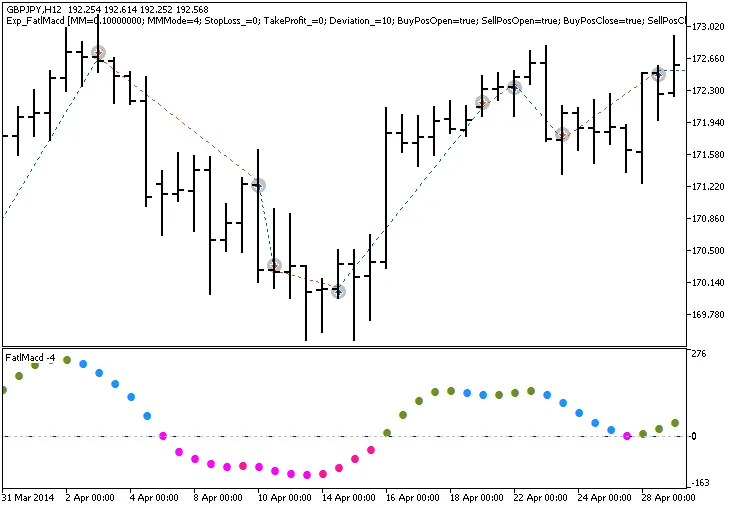
Fig.1. Trade examples on the chart
Now, let's take a look at the testing results for 2014 on the GBPJPY H12:
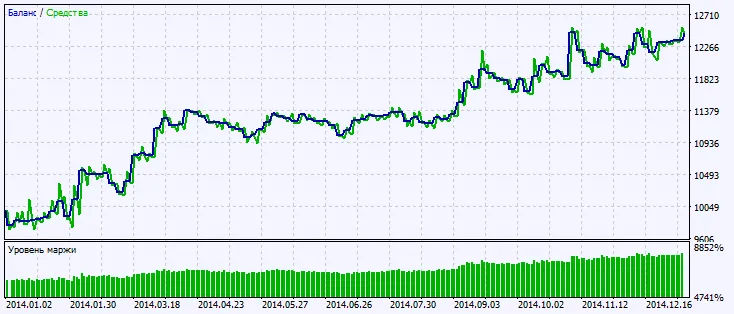
Fig.2. Testing results chart




Comments 0