
Welcome to your next trading adventure! Today, we're diving into a powerful trading system that leverages the signals from the 3LineBreak indicator. This system is designed to help you spot trading opportunities when the color of the indicator bars flips from red to blue or vice versa at the close of a bar.
To get started, you'll need the compiled indicator file 3LineBreak.ex5. Just save it in your <terminal_data_folder>\MQL5\Indicators directory, and you're good to go!
One handy feature of this Expert Advisor (EA) is its compatibility with brokers that offer non-zero spreads. Plus, it allows you to set your Stop Loss and Take Profit right when you open a position. If you're interested in exploring more options, check out the Trade Algorithms library for additional variants!
For the tests shown below, we utilized the default input parameters of the EA. Keep in mind that during these tests, we didn't implement any Stop Loss or Take Profit settings.
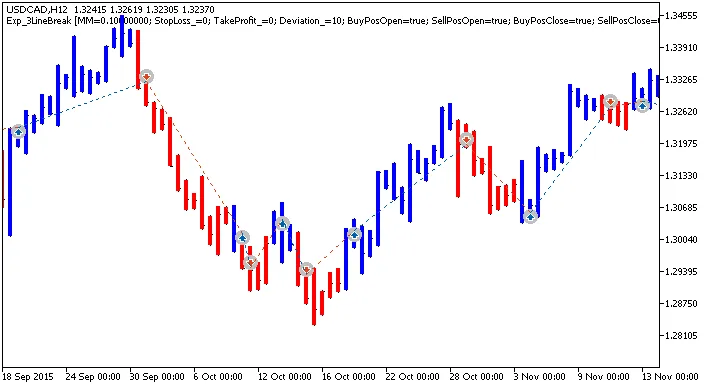
Fig. 1. Examples of trades on the chart
Now, let’s take a look at the testing results for the year 2015 using the USDCAD pair on the H12 timeframe:
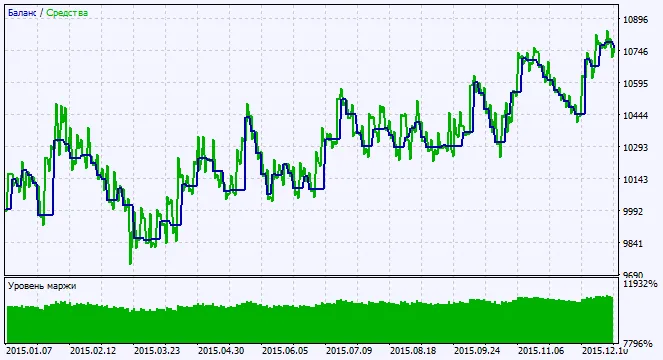
Fig. 2. Chart of testing results




Comments 0