
Are you looking to place chart objects, referred to as OBJ_CHART, onto your trading charts and use them like a regular chart? You're in luck because it's totally doable!
All you need is the handle for the OBJ_CHART object. With the Chart Operations, you can easily add or remove indicators using ChartIndicatorAdd() and ChartIndicatorDelete(), and set the chart's Period and Symbol, among other things.
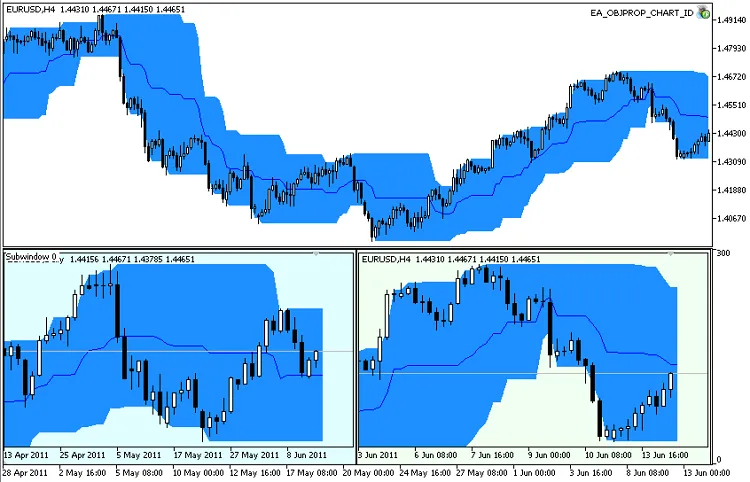
The EA_OBJPROP_CHART_ID Expert Advisor performs several key actions:
- Adds a PriceChannel indicator, which is included in the standard package of the client terminal (found in terminal_data_folder\MQL5\Indicators\Examples);
- Creates a subwindow using the Subwindow indicator (just copy Subwindow.mq5 to terminal_data_folder\MQL5\Indicators);
- Generates an OBJ_CHART type object in the subwindow with the chart symbol, specifically for D1 and H4 timeframes;
- For each OBJ_CHART object, it adds a Price_Channel indicator with default settings and changes the background color.
When you decide to remove it from the chart, it will delete all the indicators it created:
//+------------------------------------------------------------------+//| Expert deinitialization function                                     |//+------------------------------------------------------------------+voidOnDeinit(constint reason)
  {
//--- delete objects//  ObjectDelete(0,D1);//  ObjectDelete(0,H4);//--- delete subwindow
   ChartIndicatorDelete(0,subwindow_ID,"Subwindow");
//--- delete PriceChannel indicator from the main window//--- its short name with default parameters is "Price Channel(22)"
   ChartIndicatorDelete(0,0,"Price Channel(22)");
  }




Comments 0