
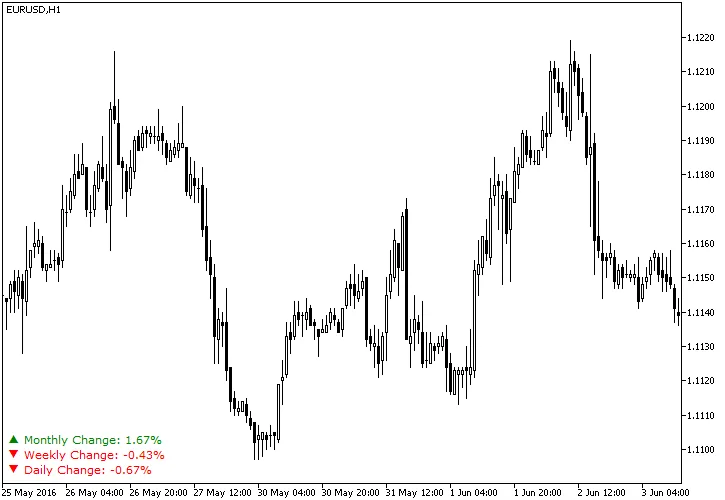
Daily Percentage Change in MetaTrader 4 is an essential tool for traders looking to track the fluctuations in currency rates relative to the previous daily close. This nifty indicator displays percentage changes directly in your main chart window, giving you instant insight into market trends. Plus, it can show weekly and monthly changes, making it a versatile addition to your trading toolkit.
With customizable colors for positive and negative changes, you can easily spot trends at a glance. The indicator also features a small, adjustable arrow to visually indicate the direction of price changes. If your broker operates in a unique time zone, don’t worry! You can adjust the Time Shift setting to ensure your data reflects the correct end of day. This indicator works seamlessly on both MT4 and MT5 platforms.
Input Parameters
General Settings
- Time Shift (default = 0) — Adjusts the day's end forward or backward; can be set between -12 and 12.
- Show Weekly (default = true) — Enables the display of weekly percentage changes on your chart.
- Show Monthly (default = true) — Enables the display of monthly percentage changes on your chart.
Appearance Customization
- Font Size (default = 8) — Sets the font size for displayed text.
- Arrow Size (default = 10) — Specifies the size of the displayed arrow.
- Up Color (default = clrGreen) — Sets the color for positive price changes.
- Up Arrow (default = "p") — The symbol used for upward price movements.
- Down Color (default = clrRed) — Sets the color for negative price changes.
- Down Arrow (default = "q") — The symbol used for downward price movements.
- No Change Color (default = clrBlue) — Sets the color for text when there's no change in price.
Positioning Options
- X Distance for Text (default = 21) — Horizontal distance in pixels from the chosen screen corner to the daily change text.
- Y Distance for Text (default = 20) — Vertical distance in pixels from the chosen screen corner to the daily change text.
- Text Corner (default = CORNER_LEFT_LOWER) — The corner of the chart where the daily change text will be displayed.
- X Distance for Arrow (default = 5) — Horizontal distance in pixels from the chosen screen corner to the daily change arrow.
- Y Distance for Arrow (default = 20) — Vertical distance in pixels from the chosen screen corner to the daily change arrow.
- Arrow Corner (default = CORNER_LEFT_LOWER) — The corner of the chart where the daily change arrow will be displayed.
- X Distance for Weekly Text (default = 21) — Horizontal distance in pixels from the chosen screen corner to the weekly change text.
- Y Distance for Weekly Text (default = 35) — Vertical distance in pixels from the chosen screen corner to the weekly change text.
- Weekly Text Corner (default = CORNER_LEFT_LOWER) — The corner where the weekly change text will be displayed.
- X Distance for Weekly Arrow (default = 5) — Horizontal distance in pixels from the chosen screen corner to the weekly change arrow.
- Y Distance for Weekly Arrow (default = 35) — Vertical distance in pixels from the chosen screen corner to the weekly change arrow.
- Weekly Arrow Corner (default = CORNER_LEFT_LOWER) — The corner for displaying the weekly change arrow.
- X Distance for Monthly Text (default = 21) — Horizontal distance in pixels from the chosen screen corner to the monthly change text.
- Y Distance for Monthly Text (default = 50) — Vertical distance in pixels from the chosen screen corner to the monthly change text.
- Monthly Text Corner (default = CORNER_LEFT_LOWER) — The corner where the monthly change text will be displayed.
- X Distance for Monthly Arrow (default = 5) — Horizontal distance in pixels from the chosen screen corner to the monthly change arrow.
- Y Distance for Monthly Arrow (default = 50) — Vertical distance in pixels from the chosen screen corner to the monthly change arrow.
- Monthly Arrow Corner (default = CORNER_LEFT_LOWER) — The corner for displaying the monthly change arrow.




Comments 0