
If you're looking to sharpen your trading skills, the semaphore indicator that combines Bollinger Bands (BB) and the Relative Strength Index (RSI) is a fantastic tool to consider.
Often, you'll notice that when the price breaks out of the Bollinger Bands channel, it tends to slow down before returning inside the channel. Similarly, when the RSI crosses into overbought or oversold territory, the price usually hits the brakes and can quickly reverse direction. By keeping an eye on these two scenarios, you can spot potential price reversals.
This indicator can help you track a breakout from within the channel into a slowdown zone while taking the RSI into account. Conversely, it will signal when the price is moving from a slowdown zone back into the channel with a confirmed RSI reversal signal. You also have the flexibility to disable either the RSI signal or the slowdown zone alert. Plus, you’ll get an audible alert when an arrow appears, so you won’t miss a beat!
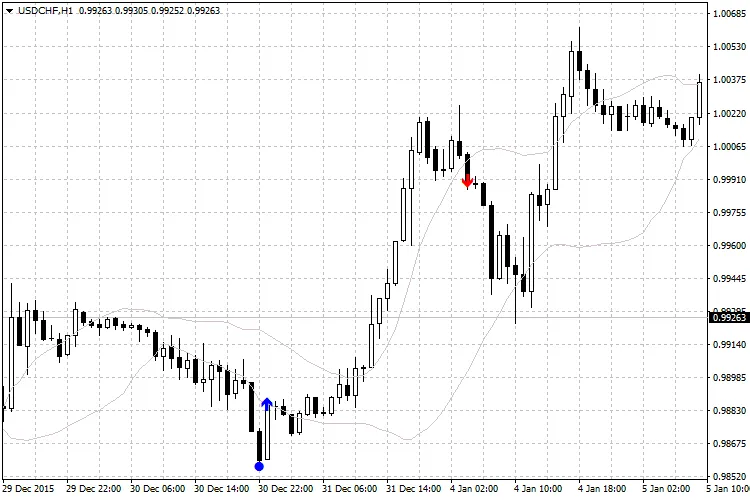
Pro Tip:
- It’s often wise to wait for both signals to align. First, look for the breakout signal from within the channel (the circle), and then wait for the price to signal its return into the channel (the arrow) before opening a position.
Customizing Your Settings:
- RSIPeriod: Set the RSI period.
- RSIUpLevel: Define the upper signal level for the RSI.
- RSIDownLevel: Set the lower signal level for the RSI.
- BBPeriod: Choose the period for the Bollinger Bands.
- BBDeviation: Select the deviation for Bollinger Bands (1 or 2).
- CrossInside: Enable this to show the signal of price returning into the channel.
- CrossOutside: Enable this to show the signal of price breaking out of the channel.
- alerts: Turn on sound alerts to stay informed.
- ShowBB: Set to "true" to display Bollinger Bands or "false" to hide them.
- clrBB: Customize the line color for the Bollinger Bands.




Comments 0