
Hey fellow traders! Today, let's dive into the madnessMA indicator designed for MetaTrader 4. This handy tool calculates the correlation between moving averages (MAs) of different periods, giving you insights that can sharpen your trading strategy.
Understanding the Lines
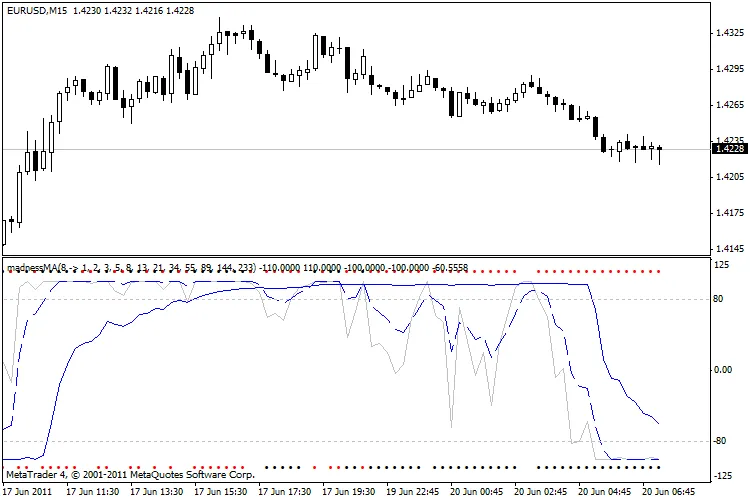
Here’s a quick rundown of what the various lines and dots represent:
- Black/Red dots - Indicate Open/Close signals. If the dots appear above the chart, it’s a BUY signal; if they’re below, it’s a SELL signal.
- Silver Line - Reflects trend correlation. A value of 100 means all MAs are in an upward trend, while -100 indicates all MAs are in a downward trend.
- Blue Line - Shows Sort Degree. A value of 100 signifies all MAs are ascending, and -100 means all are descending.
- Blue Dashed Line - Represents a rough Sort Degree comparing MAcheck, Higher MAs, and Lower MAs. A value of 100 indicates that all Higher MAs are above MAcheck and all Lower MAs are below it. Conversely, -100 suggests a mixed situation where Higher MAs are less than MAcheck, which is in turn less than Lower MAs, indicating no clear order.
Parameters Overview
The parameters are pretty self-explanatory. Here’s a glimpse:
//---- input parametersexternstring ________________01="List of MAs, eg from Fibonacci: 0, 1, 1, 2, 3, 5, 8, 13, 21, 34, 55, 89, 144, 233, 377, 610, 987, 1597";
externstring listMA="1, 2, 3, 5, 8, 13, 21, 34, 55, 89, 144, 233";
externstring ________________02="MA to check SORT DEGREE";
externint MAcheck=8;

externstring ________________10="MA sort type";
externint MAmethod = 1; // iMA moving average method:// 0 Simple moving average,// 1 Exponential moving average,// 2 Smoothed moving average,// 3 Linear weighted moving average.
Visual Representation
With the madnessMA indicator in your toolkit, you can enhance your trading decisions and stay ahead of the game. Happy trading!




Comments 0