
Get Your Free Optimized Versions:
MetaTrader 4:Download Here
MetaTrader 5:Download Here
Follow us on Instagram: @borelatech
The High, Low, and Close indicator is a handy tool for traders, displaying the high, low, and closing prices from the previous day, week, or month. These price levels are crucial for identifying support and resistance, and this indicator makes it easy to visualize them on your chart. It even creates a clear gap between different time periods to help you distinguish when a new one begins.
Latest Updates:
- Update 1.1: Added some optimizations for improved performance.
- Update 1.1.1: Fixed compilation errors in newer MetaTrader compilers.
Settings Breakdown:
- Precision: Select the timeframe for calculating the High, Close, and Low. This setting is key when applying time shifts. For instance, if you’re using a GMT+2 broker and want to calculate GMT+0 levels, set the Hour shift to -2 and Precision to H1 to ensure accurate closing values.
- Period: Choose from the previous day, week, or month—only one option at a time. If you want all three, simply add multiple instances of the indicator.
- Periods to Calculate: Specify how many days, weeks, or months to display, ensuring only relevant prices are shown.
- Hours Shift: Self-explanatory. Just remember, Precision must be set to at least H1.
- Minutes Shift: Also straightforward. Ensure Precision is a multiple of the minutes shift (e.g., a 15-minute shift requires Precision set to M15).
- Ignore Sunday: Merges Sunday bars into Monday, affecting only the previous day mode.
- Ignore Saturday: Merges Saturday bars into Friday, affecting only the previous day mode.
- Buffer Visibility: Customize which lines to show or hide.
- Probe Visibility: Control the visibility of value tags.
- Probe Color: Choose the color for the value tags.
- Probe Size: Adjust the size of the value tags.
- Data Window Label: Customize the text displayed in the data window and tooltips for each line.
IMPORTANT: When using time shift and precision settings, the indicator might briefly show incorrect levels as MetaTrader downloads the necessary bars. If using H1 for precision, ensure the bars have fully downloaded.
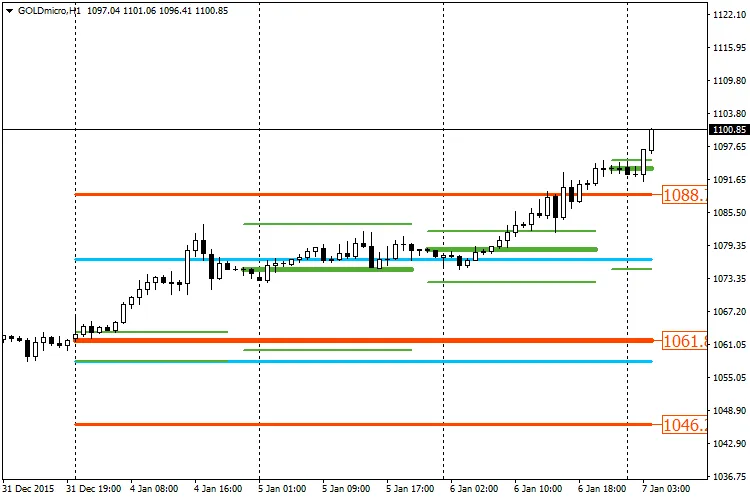
The image below displays the High, Close, and Low for the previous day (Green), previous week (Blue), and previous month (Red). Three instances of the indicator are attached to the chart. Notice how only the month lines show the value tag at the end (as per the probe settings). Feel free to download this template for your own use!




Comments 0