
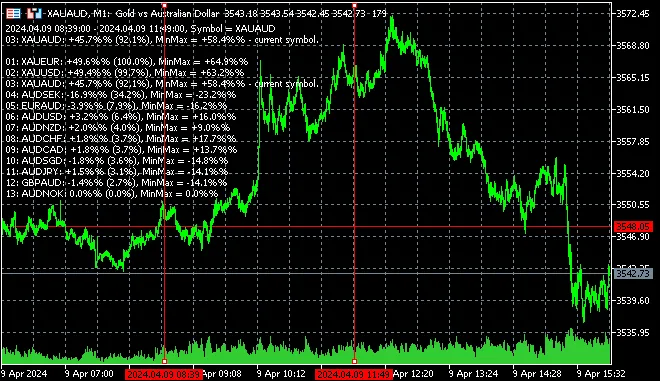
Hey traders! If you’re looking for a nifty tool to keep tabs on price movements in MetaTrader 5, you’ll want to check out the PriceChanges indicator. This handy multi-symbol indicator allows you to visualize price changes of various symbols right from your Market Watch, and it does so between two dates marked by vertical lines.
What’s great about this feature is that it gives you a quick and easy way to assess how much different currencies have moved, helping you get a clearer picture of the market dynamics at play. This can be a game-changer when it comes to making informed trading decisions.
Managing the Indicator
Managing the dates in the PriceChanges indicator is a breeze! You can easily adjust them using your mouse, and you can also navigate through the display using your keyboard. Here are some key shortcuts you’ll find handy:
- KEY_C: Press C to switch symbols.
- NUMPAD_0: Use 0 on the numpad for quick access.
- OPEN_BRACKET: Press [ to open a symbol.
- CLOSE_BRACKET: Press ] to close a symbol.
This functionality allows you to swiftly toggle between different symbols, enhancing your overall trading experience. Trust me, you’ll notice the difference once you start using it!
Features of PriceChanges
One of the best parts about this indicator is that it restarts automatically at startup and also resets when you switch symbols. This means you can focus on your trading without worrying about constant manual adjustments.
Give PriceChanges a try, and see how it can help streamline your trading process!




Comments 0