
If you're diving into the world of automated trading, the Exp_JBrainTrend1Stop EA is definitely worth your attention. This Expert Advisor operates based on signals generated by the NRTR indicator, known as JBrainTrend1Stop.
The magic happens when a bar closes and there's a color change in the indicator. That's your cue to make a move!
For everything to run smoothly, make sure to place the compiled indicator files JBrainTrend1Stop.ex5 and JMA.ex5 into your terminal's data folder under MQL5\Indicators.
Keep in mind that the TradeAlgorithms.mqh library file is a must-have if you're trading with brokers offering a nonzero spread. It also gives you the flexibility to set Stop Loss and Take Profit levels right when you open your position. If you’re looking for more options, check out the Trade Algorithms library.
The testing below uses the default input parameters of the Expert Advisor. Note that neither Stop Loss nor Take Profit was applied during these tests.
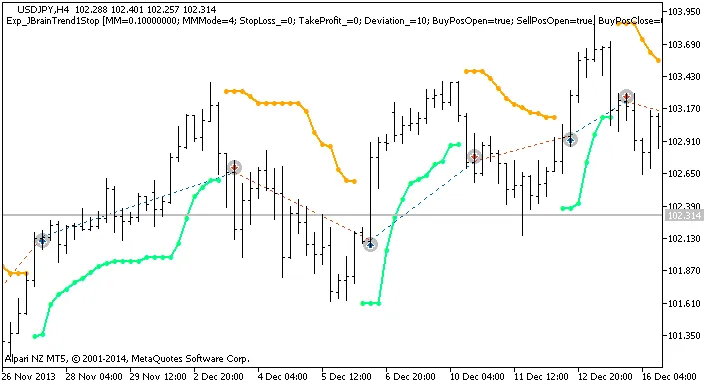
Fig. 1 The instances of history of deals on the chart.
Here are the testing results for the year 2013 on the USDJPY H4 chart:
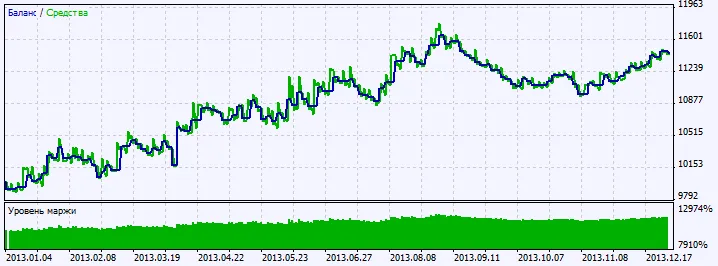
Fig. 2. Chart of testing results




Comments 0