
Idea by: costy_
MQL5 code author: barabashkakvn
The 55 MA Expert Advisor (EA) leverages the iMA (Moving Average) indicator in MetaTrader 5, giving you the flexibility to adjust the timeframe, horizontal shift, averaging method, and the applied price. The only fixed parameter is the averaging period, which is set at 55—hence the name!
How It Works
This EA kicks into gear during the formation of a new bar. Once the current hour falls within the specified Start hour to End hour range, the EA pulls data from the indicator. Instead of just looking at the last two bars, it compares values from Bar number #A and Bar number #B.
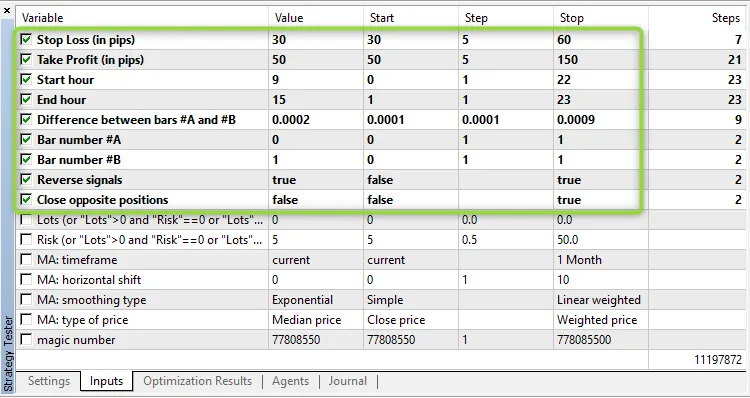
If the difference between these two bars meets or exceeds the Difference between bars #A and #B, a trade signal is generated. The option for reverse signals is turned off by default (set to false), and here’s how the signals are defined:
BUY Signal: MA(Bar number #A) > MA(Bar number #B) + Difference between bars #A and #B;
SELL Signal: MA(Bar number #A) Bar number #B) - Difference between bars #A and #B.
If you want to manage your positions more dynamically, you can enable the option to close opposite positions (set Close opposite positions to true), allowing Sell positions to close on a final BUY signal and vice versa.
Volume Calculation
You have two ways to set your position volume: it can be fixed via the Lots parameter, or it can be calculated based on the Risk parameter (just make sure Lots is set to zero in this case).
How to Optimize
To get the most out of the EA, optimize it for each specific symbol and timeframe. Since it operates at the new bar formation time, you can run genetic optimization using the "1 minute OHLC" tick generation mode.
Check out the approximate parameter limits for timeframes ranging from M15 to H1:




Comments 0