
The brains behind this idea: Scriptor, with the MQL5 code crafted by barabashkakvn.
This system is all about spotting the intersection of two Moving Averages based on data from two bars to generate trading signals:
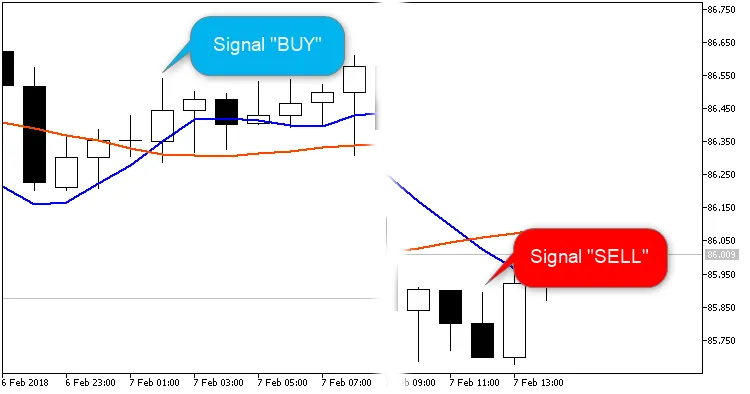
You can specify the current bar in the Trade bar setting: choose either bar #0 or bar #1.
When Use MACD is set to true, our Expert Advisor (EA) will also factor in the position of the main MACD line in relation to zero, based on the Trade bar setting.
If a signal pops up and you don’t have any open positions, the EA will open a position and set four hedging orders at a distance defined by the Hedge level, with a lifespan equal to Expiration pending orders: Buy Stop orders are placed for a BUY position, while Sell Stop orders are set for a SELL position.
Positions can be closed with an opposite signal if you’ve turned on the Close the opposite positions feature. For instance, any SELL positions will be closed when a BUY signal appears.
Once your positions are live, a Trailing Stop with a specified Trailing Step will kick in to help lock in profits.
Input Parameters
- Lots - the volume of the position to open;
- Stop Loss (in pips) - your Stop Loss value;
- Take Profit (in pips) - your Take Profit value;
- Trailing Stop (in pips) - the trailing value;
- Trailing Step (in pips) - the trailing step value;
- Hedge level (in pips) - distance between pending orders;
- Close the opposite positions - option to close opposite positions;
- Use MACD - option to include MACD;
- Expiration pending orders (seconds) - time until pending orders expire;
- MA short: averaging period - fast MA calculation setting;
- MA long: averaging period - slow MA calculation setting;
- Trade bar - the number of the bar to trade on;
- Magic number - unique identifier for the EA.
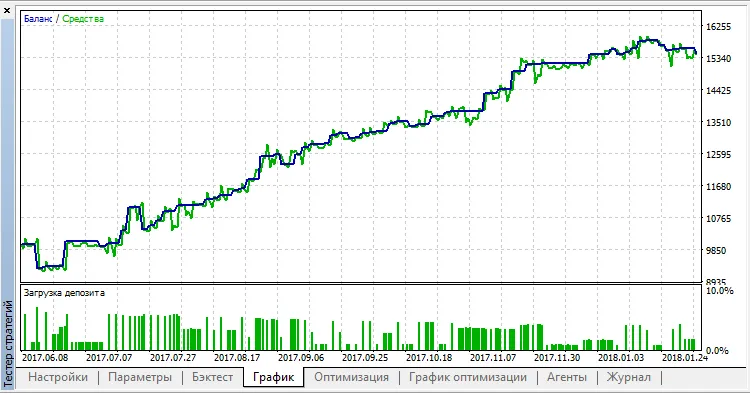
Here’s a quick example of testing with EURUSD on the M30 timeframe:




Comments 0