
Hey there, fellow traders!
Today, we're diving into the world of the i-Regr (Regression Channel) indicator, a powerful tool for your MetaTrader 5 setup. Let's get started!
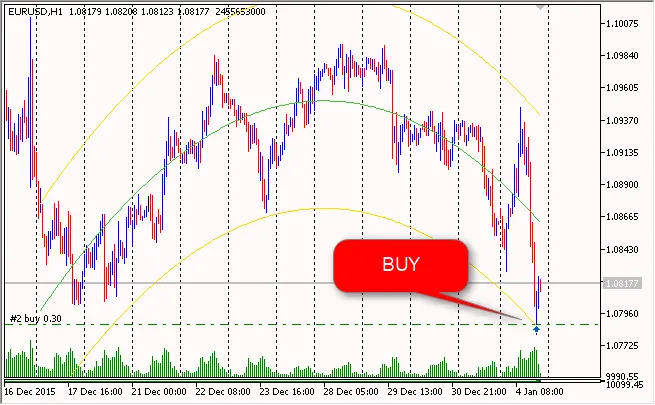
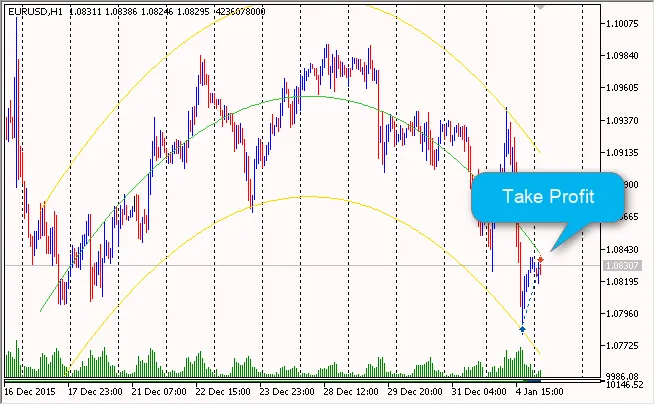
The i-Regr indicator gives you access to various regression channels, including:
- Linear Regression Channel
- Quadratic (Parabolic) Regression Channel
- Cubic Regression Channel
One feature I love about this setup is the trend protection. If the previous day's D1 exceeds 1500 pips (you'll find this under the protection size D1 bar input), it will automatically disable trading and close any open positions. This is a real lifesaver for volatile markets!
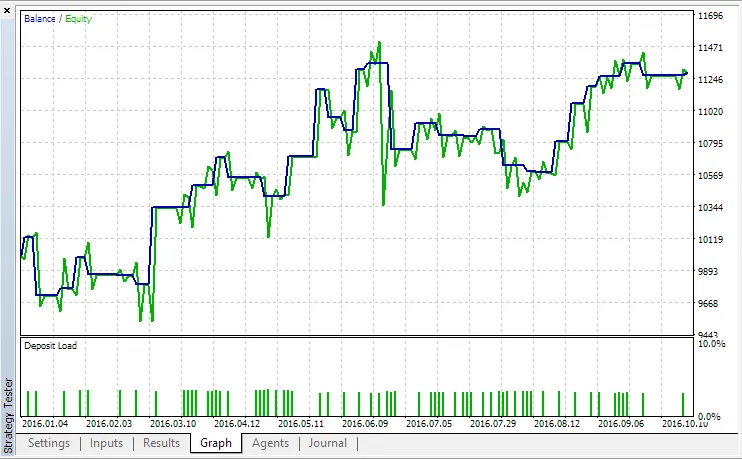
For testing, I ran the strategy from January 1, 2016, to October 26, 2016, starting with a deposit of 10,000 and using the H1 timeframe:
Before you dive in, ensure that the i-Regr indicator is placed in the \MQL5\Indicators\ folder of your system. Here’s a quick look at the initialization code you’ll need:
//| Expert initialization function |
//+------------------------------------------------------------------+
intOnInit()
{
m_symbol.Name(Symbol()); // sets symbol name
m_trade.SetExpertMagicNumber(m_magic); // sets magic number
//--- create handle of the indicator i-Regr
handle_i_Regr=iCustom(Symbol(),Period(),"i-Regr",
Regr_kstd,
Regr_degree,
Regr_bars,
Regr_shift
);
//--- if the handle is not created
if(handle_i_Regr==INVALID_HANDLE)
And that's a wrap! Dive into the world of i-Regr, and let me know how it works for you. Happy trading!




Comments 0