
Hey fellow traders! Today, let’s dive into the JMASlope trading system, designed specifically for MetaTrader 5. If you’re on the hunt for a reliable system that signals trades based on the JMASlope indicator, you’re in the right place!
How the JMASlope Works
This trading system generates signals at the close of each bar, giving you a clear entry point. Depending on your chosen settings, you can select one of two trading algorithms:
- Mode 1: Breakdown - This algorithm triggers a trade signal when there’s a breakthrough of the zero line.
- Mode 2: Direction Change - This one signals a trade when the oscillator shifts direction.
Setting Up the JMASlope
To get started, simply place the JMASlope.ex5 file in your terminal data folder under MQL5/Indicators.
During our tests, we used the default parameters for the Expert Advisor, and we didn’t apply Stop Loss or Take Profit settings. This will give you a clearer picture of the system’s performance.
Testing Results
Here’s a snapshot of the testing results for 2011 on the XAUUSD H4 timeframe:
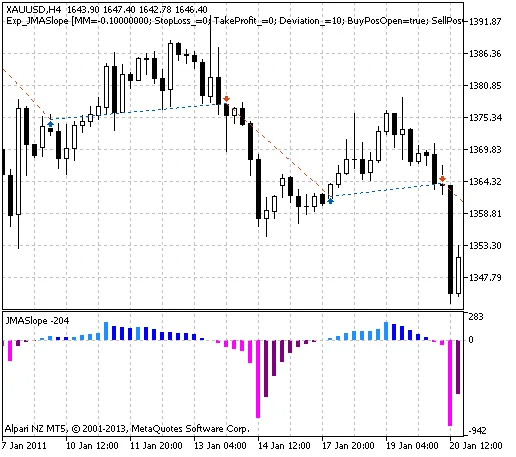
Fig. 1. The instances of history of deals in the chart.
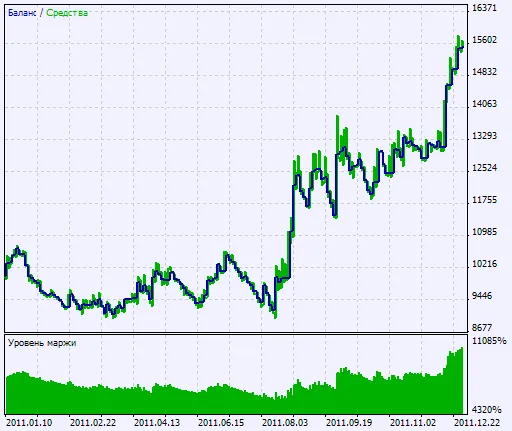
Fig. 2. Chart of testing results
So, there you have it! The JMASlope EA could be a solid addition to your trading toolkit. Have you tried it yet? Let me know your thoughts in the comments below!




Comments 0