
If you're looking to enhance your trading game, the ColorXPWMA_Digit trading system might be just what you need. This system uses a nifty indicator to signal when to adjust the volume of your trades based on previous performance, giving you a solid edge in your trading strategy.
One of the standout features of this Expert Advisor (EA) is its ability to dynamically manage trade volumes. Here's how it works: at the close of each bar, if the trend shifts—which is indicated by a change in the color of the indicator line—the EA will generate trading signals. This means you can stay ahead of the curve and make informed decisions.
To help you manage your positions effectively, we’ve added a block of input variables within the EA:
inputuint    BuyTotalMMTriger=5; // Last five Buy trades for stop loss calculation
inputuint    BuyLossMMTriger=3;  // Losing Buy trades to reduce MM
inputuint    SellTotalMMTriger=5;// Last five Sell trades for stop loss calculation
inputuint    SellLossMMTriger=3; // Losing Sell trades to reduce MM
inputdouble  SmallMM_=0.01;      // Deposit share for loss trades
inputdouble  MM=0.1             // Normal trading deposit share
input MarginMode MMMode=LOT;      // Method for determining lot value
With these input settings, if the last five trades include three losses in the same direction, the EA will open the next trade with a volume of 0.01 lot. If there are fewer than three losing trades out of the last five, the volume will be set to 0.1. It's a smart way to scale your risk based on recent performance!
To ensure everything runs smoothly, make sure you have the compiled ColorXPWMA_Digit.ex5 indicator file stored in your <terminal_data_directory>\MQL5\Indicators folder.
Below are some testing results using the default input parameters with stops:

Fig. 1. Example trades on the chart
Here are the testing results for GBPJPY on the H1 timeframe during 2017:
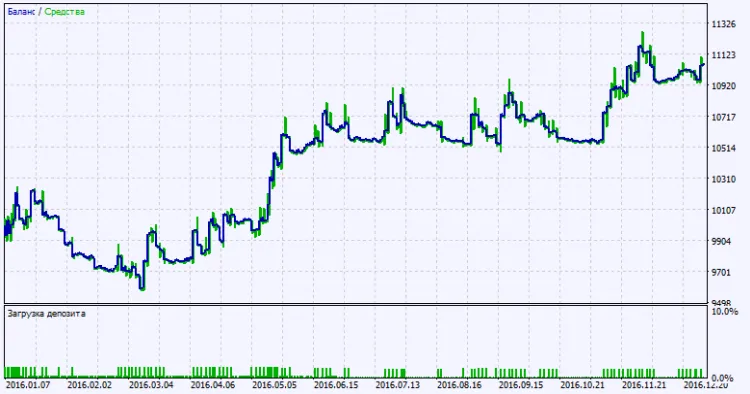
Fig. 2. Test results chart




Comments 0