
If you're looking to enhance your trading strategy, the 2XMA Ichimoku Oscillator could be your new best friend. This trading system generates signals based on the closing bars and detects changes in the indicator's direction, helping you make informed trading decisions.
To get this Expert Advisor (EA) up and running, you'll need to ensure that the compiled files for the indicators XMA_Ichimoku.ex5 and 2XMA_Ichimoku_Oscillator.ex5 are placed in the <terminal_data_directory>\MQL5\Indicators folder. This setup is crucial for the EA to function correctly.
Keep in mind that the library file TradeAlgorithms.mqh is tailored for EAs that work with brokers offering a nonzero spread. It also allows you to set your Stop Loss and Take Profit levels right when you open a position. If you need more versions of this library, you can grab them at Trade Algorithms.
For the tests shown below, we used the EA's default input parameters, and we didn't incorporate Stop Loss and Take Profit settings into our testing.
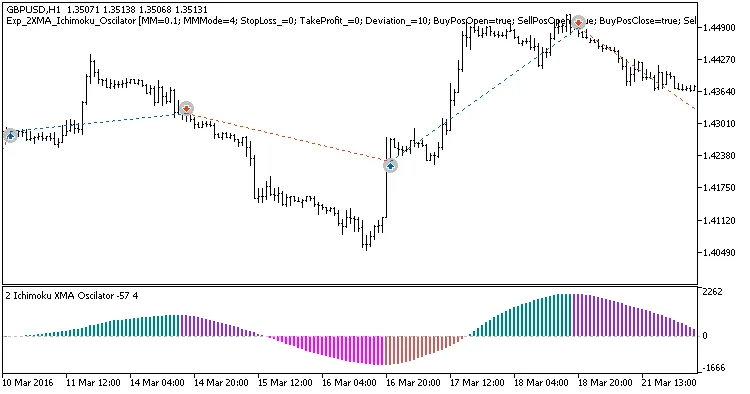
Fig. 1. Example trades on the chart
Here's a look at the testing results for GBPUSD on the H1 timeframe throughout 2016:
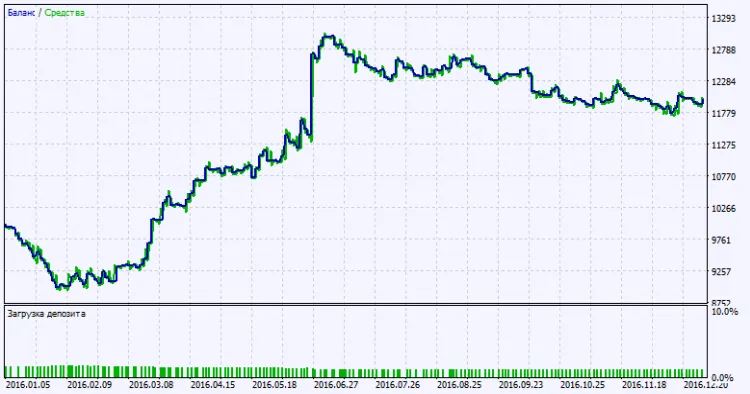
Fig. 2. Testing results chart




Comments 0