
If you're looking to enhance your trading game, the Exp_CronexDeMarker EA might just be the tool you need. This Expert Advisor leverages the signals generated by the CronexDeMarker oscillator to help you make informed trading decisions.
The magic happens when a bar closes and the color of the indicator's cloud changes. That's your signal to take action!
To get this EA up and running, you'll need to place the compiled indicator file CronexDeMarker.ex5 in your terminal data folder under MQL5/Indicators. This step is essential for the EA to function correctly.
One crucial point to keep in mind: the TradeAlgorithms.mqh library file allows you to use Expert Advisors with brokers that offer a nonzero spread. Plus, it gives you the flexibility to set Stop Loss and Take Profit right when you open a position. You can grab more versions of this library at this link: Trade Algorithms.
In the tests I ran, I used the default input parameters for the Expert Advisor. Notably, Stop Loss and Take Profit were not applied during these tests.
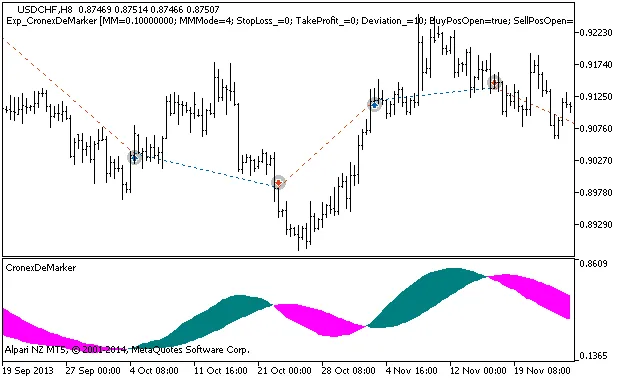
Figure 1: Instances of history of deals on the chart.
For those curious about performance, here are the testing results for 2013 using the USDCHF on the H8 timeframe:
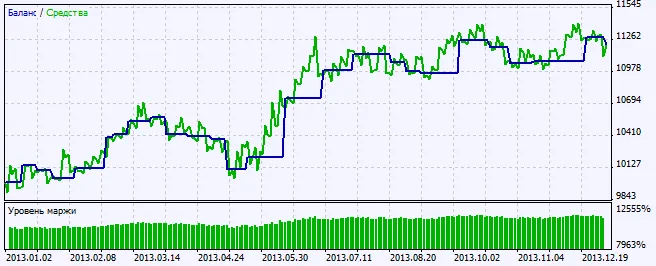
Figure 2: Chart of testing results




Comments 0