
Hey fellow traders! If you're looking to level up your trading game, let me introduce you to the Exp_FrAMACandle Expert Advisor. This nifty tool is powered by the FrAMACandle indicator, which detects candlestick color changes to help you make informed trading decisions.
The way it works is pretty straightforward: the EA generates signals based on changes in candlestick color at the closing of each bar. It's a great way to catch potential market moves!
To get started, you'll need the compiled indicator file FrAMACandle.ex5. Simply drop it into your <terminal_data_folder>\MQL5\Indicators directory, and you'll be all set.
One thing to keep in mind is that the TradeAlgorithms.mqh library file is essential for using this EA with brokers that offer nonzero spreads. It also allows you to set Stop Loss and Take Profit right when you open a position. You can find more versions of this library here.
The testing results below are based on the default input parameters of the Expert Advisor. Notably, Stop Loss and Take Profit were not used during these tests.
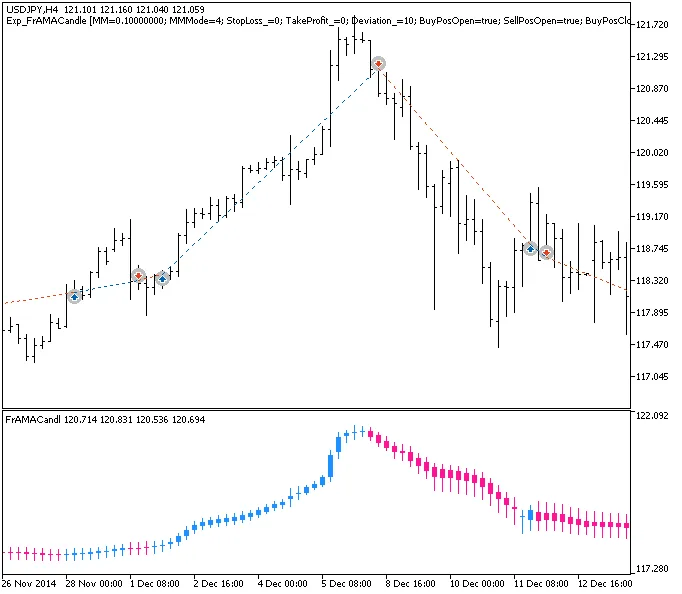
Fig.1. Examples of deals on the chart
The testing results for 2014 on the USDJPY pair, using the H4 timeframe, are as follows:
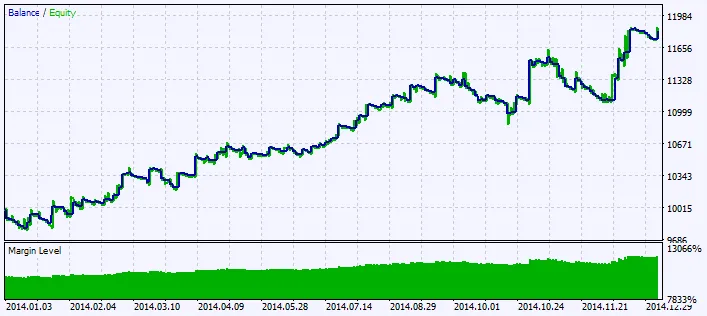
Fig.2. Testing results chart




Comments 0