
The Exp_KaufWMAcross trading system is designed to help you identify shifts in trend direction, utilizing the KaufWMAcross indicator. This EA (Expert Advisor) takes the guesswork out of trading by automatically generating signals based on the latest indicator arrows.
A trading signal is triggered when a bar closes and a new arrow appears on the KaufWMAcross indicator. This feature is essential for keeping you one step ahead in the market.
To get started, you’ll need the compiled file of the KaufWMAcross indicator, which you can find as kaufwmacross.ex5. Simply place this file in the terminal_data_folder\MQL5\Indicators directory of your MetaTrader 5 platform.
For the tests shown below, we used the default settings for the EA. Notably, Stop Loss and Take Profit parameters were not applied during these tests, allowing us to focus purely on the signal performance.
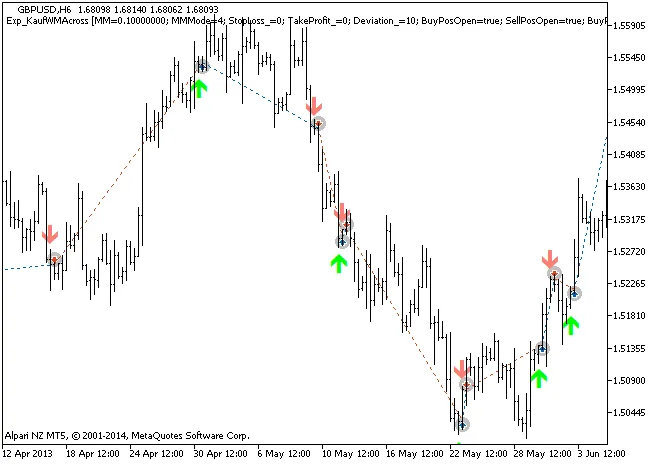
Fig. 1 The instances of history of deals on the chart.
Looking at the testing results for 2013 on the GBPUSD H6 timeframe, you can see how effective this EA can be:
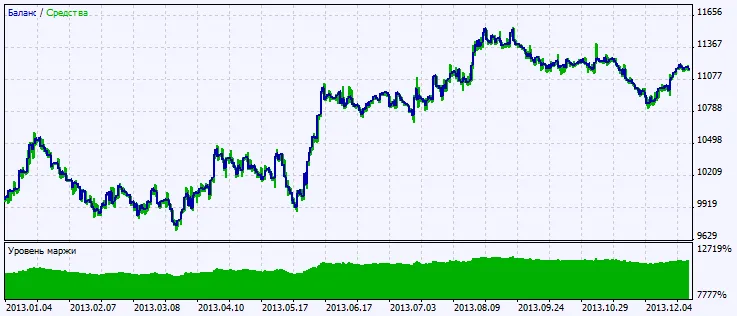
Fig. 2. Chart of testing results




Comments 0